Product
Where Did They Go? Journeys, Insights, and Person-Level Funnels


The last of these posts went out in September. Since then, our deepest work has been in Analytics, and most of it answers the question a funnel raises and cannot settle on its own: "I can see the drop-off, so where did those people go?"
Say a funnel shows that a third of the visitors who started the appointment form never submitted it. The funnel does not show where they went instead. To see that information, somebody has been exporting events to a spreadsheet or opening replays one at a time. Those are product analytics questions: what people do, in what order, how often, and where they stop.
This release answers those questions in four different ways. Journeys shows you the paths people take around the events you care about. Insights charts any event over time, with the comparison built in. Funnels follow one person across visits instead of one session. And Query Events gives you the raw event stream with filters, columns, and an export, for the questions none of the saved reports anticipated.
Journeys, Insights, and Funnels are part of the Analytics Suite. Query Events sits under Data and does not need the Analytics Suite. All of these features run inside Ours Privacy under the same Business Associate Agreement and the same consent and governance rules as the rest of the platform.
Journeys
Journeys is live under Analytics. It is the product analytics view of what happens around an event: you pick between one and ten anchor events or page views, and the report shows what people did before, between, and after them. Each anchor can accept alternatives, so "Appointment Requested or Callback Requested" counts as one step.
What it includes:
Two views of the same data. User Flows draws a flow diagram of the paths through your anchors. Top Paths ranks the most common sequences as a list, with a group for everything else.
Choose what to count. Unique people, sessions, or total attempts. When you count people, visits are joined by visitor ID, and server-side events from any enabled source land in the same journey as the browser events.
Windows you set. A conversion window between anchors of up to 90 days, with 30 as the default, and a context window for how far before and after to look.
Filters at every level. On entry, on the path, on the session, and on all anchors at once, with a source scope and a bot toggle.
Cleanup controls. Hide an event that adds noise, collapse repeats of the same step, and pin a step or an outcome to focus the diagram on completed or incomplete journeys.
Timing and samples. Elapsed time on every edge and across the whole journey. Up to 50 visitor or session samples per outcome, each linked to its replay when one exists.
Save and share. Analyses save with every setting intact and export to CSV or PDF.

A saved journey in the User Flows view, with Landing and an appointment request as anchors, the pages people visited before, the events after, and the completed and not-observed outcomes
The June post described Journeys as rolling out soon. The version we're shipping now is wider than the one I described then, because the saved-analysis model turned out to matter more than the diagram. A flow diagram you build once and lose is a demo. A flow diagram with a name, a conversion window, and a filter set that reopens the same way next month is a report somebody owns.
Two names changed along the way. The step-by-step page walker that used to be called Journey Explorer is now Path Explorer, and it still lives under Web Analytics. "Journeys" now refers to the saved flows above. Journeys are also reachable over the REST API as Journey Flows, including preview, results, and CSV export, so an agency can build the same analysis for forty clinics from one script.
Insights
Insights is a new page under Analytics that answers a simple question: how often does this event happen, and is that more or less than before? It charts any event your sources send, from the website, a server, or an imported file.
What it includes:
Up to ten metrics on one chart. Each metric matches one or more events and measures total events, unique visitors, or the sum or average of a numeric property. Average appointment value by week sits next to form starts by week on the same axes.
A filter per metric and a filter for the report. Filter one metric to a campaign and leave the others whole, or filter the whole report to a source.
Six chart types. Line, column, bar, pie, metric tiles, and table, with stacking, a log scale, cumulative values, and a rolling average up to 30 periods.
Compare to another period. Previous period, previous year, or a start date you pick. Periods still in progress are marked as partial so a half-finished week does not read as a drop.
Save and export. Reports save and reopen. Export to PDF, PNG, or CSV, or copy the CSV to paste into a sheet.
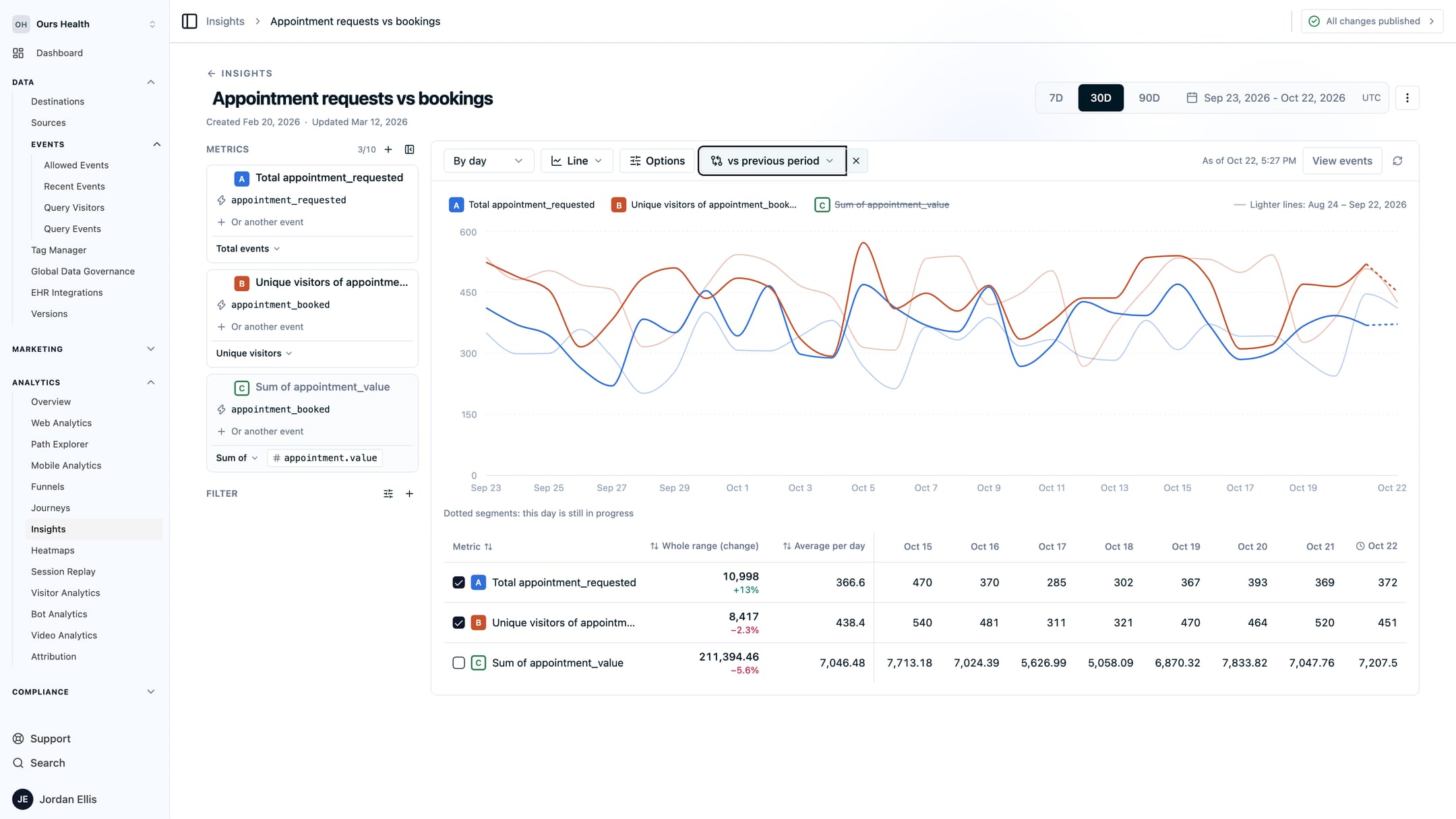
An Insights report charting appointment requests and unique visitors who booked over 30 days, with the previous period drawn as lighter lines and the change shown in the totals
A few things worth knowing as you read your reports. Unique visitors are counted once across the whole date range, not added up day by day, so someone who visits on five days in a month counts as one visitor in the monthly total. Weeks start on Monday, and dates are in UTC. Saved reports keep their events, filters, and settings, but reopen on the last 30 days with no comparison applied, so the numbers stay current while the setup stays the same. Breakdowns by property are coming soon.
A quick note on names: “Insights” shows up in a couple of other places in Ours Privacy. Event Attribution Insights is a report in the Attribution Center, and Page Insights is part of the Web Scanner. The new Insights page is separate from both. It charts events over time.
Funnels Follow the Person
Funnels were rebuilt on the same query engine as Journeys and Insights, and the change you will notice first is the default. A new funnel follows a person across visits by default, instead of requiring every step to land in one session. A visitor who reads the service page on Tuesday and requests an appointment on Friday counts as a conversion, with three days of time to convert. Session funnels are still available when a single sitting is what you want to measure.
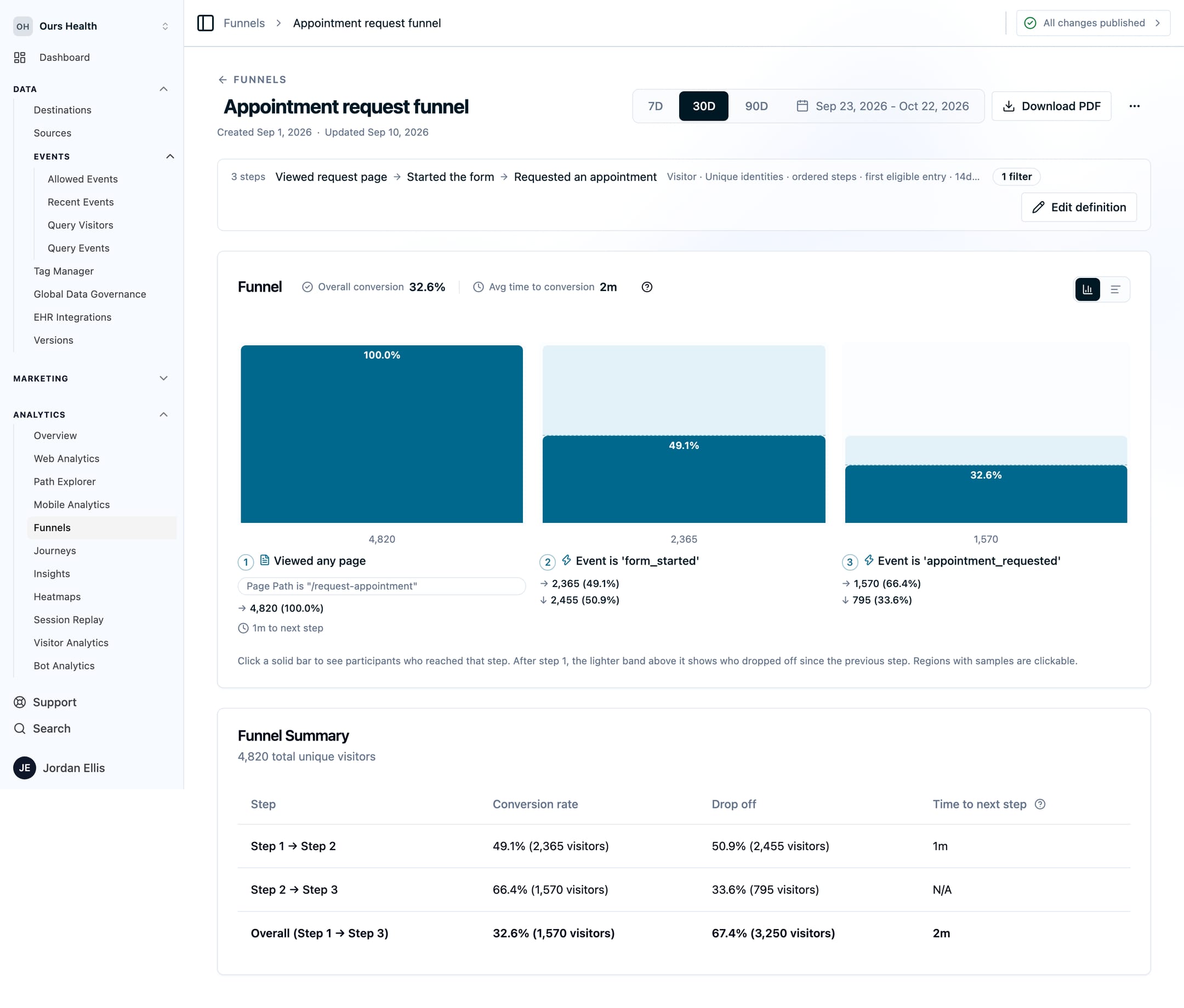
A funnel detail page showing overall conversion, average time to conversion, and three steps with reached and dropped-off counts
What else changed:
90 days instead of 30. A funnel query can now cover 90 elapsed days, and the conversion window can be as long as the range.
Every setting spelled out. You choose what to count (unique people, sessions, or events), whether steps must happen in order or in any order, and which attempt counts when someone enters the funnel more than once (their first or their best). You also set the conversion window, which is how long someone has to finish.
Three levels of filters. One on who enters the funnel, one on every matched event, and one per step. A step can match a URL fragment, so a single-page form that moves through
#step-2and#step-3without a page load still produces a readable funnel, provided the page sends an event on each change.Property suggestions. The filter picker suggests custom event and visitor properties seen in the last 30 days, and you can still type a path by hand.
One page to read and edit. The definition opens in a side panel on the funnel's own page, so you adjust a step and watch the numbers change without leaving.
A funnel that counts events rather than people now shows event volumes per step instead of drop-off percentages, both in the funnel and in the experiment dashboard that embeds it. Drop-off describes people. For an event count, the volume at each step is the number worth reading.
Funnels remain available over the REST API and through the MCP server, where an agent can list funnels, read a definition, and pull results. The Funnels guide covers setup. Results are computed live on every view. Large accounts with any-order funnels over long ranges may see a query time out, and we are working on that.
Query Events
Query Events, under Data and then Events, has been rebuilt as a way to explore every event your sources send. It’s made for the questions no saved report anticipated, like “Which appointment requests came from this campaign last month, and what did visitors enter in the form?”
What it includes:
Typed filters. And, or, and not, with operators for equals, contains, starts with, in a list, exists, missing, and the rest. The picker suggests values it has seen.
Include and exclude. Up to ten groups of events to include or leave out, each with its own filter, plus a global filter over everything.
Scope and search. Narrow to one visitor, one session, an email, a source, or a page path. Free-text search on top.
Columns you choose. Up to 20 property columns in the table, so the fields you care about sit in the grid instead of inside a JSON blob.
Bots and test events off by default. Two toggles bring them back when debugging is the point.
Any range up to a year. Presets from today to twelve months, or a custom range, with an option to exclude the current partial day, week, month, or quarter.
One event, inspected. Open any row to see its fields, the JSON, the raw payload as it arrived, every destination dispatch it produced, and the visitor profile behind it.
Export what you loaded. CSV or JSON of the rows in the table. Load more rows first if you want more in the file.

Query Events with two included event groups, one filtered to a source, an excluded event, a country filter, and three custom property columns in the table
The dispatches tab is the one I would show first. A row in Query Events tells you an event happened. Its Dispatches tab tells you which destinations received it, what each one was sent, and whether it succeeded. Destination activity now links back into Query Events too, so a failed dispatch on the destination page opens the event that caused it. Raw payloads and exports require the same event-detail permission as before, and every query is audit logged.
A word on scope. Query Events is a point-and-click explorer. In August, I said the next step for the platform was governed access to your own event data with SQL. That work is still ahead of us. Query Events answers the version of the question most people were asking, without an export: show me these events, with these properties, from these people.
Also New
J-Shaped attribution. Conversion Attribution gained a sixth model. J-Shaped gives 60 percent of the credit to the converting touch and20 percent to the first touch, then splits the remaining 20 percent across the touches in between. It suits a business where the last click closes but the first visit is what you paid for. (Conversion Attribution)
A Calls report. Under Reporting and then Standard Events, a prebuilt Calls dashboard shows call volume, outcomes, the sources that brought callers in, and the list of calls behind the numbers. It appears for organizations sending the call_tracked standard event. (Standard Healthcare Events)
Hourly grouping in Web Analytics. Trend charts can group by hour across a multi-day range. Monday's spike resolves into a 9 a.m. campaign send or a 3 p.m. news mention. (Web Analytics)
Conversion Paths as a PDF. The Conversion Paths report, which summarizes how long conversions take, how many touches they involve, and which sources open and close them, now downloads as a PDF. (Conversion Journey Summary)
Heatmaps show the whole domain. The Heatmaps page list shows host and path, so /contact on two brands stops looking like one page. Heatmaps and Session Replay now share the same filter bar and date controls as the rest of Analytics. (Heatmaps)
What's Next
What’s next is SQL access to your event data, with the same governance as the rest of the platform. It’s the piece I most want to ship in Analytics. Query Events gets you most of the way for most questions, and a query language covers the rest. Together with Journeys, Insights, and Funnels, that rounds out product analytics for teams whose data cannot leave a platform built for health information.
Journeys and Insights both need breakdowns, so you can split a chart or a flow by source, device, or any property without building a filtered copy per value. Comparisons between two saved journeys are on the same list. Each of the new pages has its own guide: Journeys, Insights, Query Events, and the rewritten Funnels.
If you have a question your current analytics tool makes you export to answer, book a demo and bring the question.
Related Articles
Newsletter
Stay up to date
Subscribe for privacy news, feature updates, events, etc.
