Product
Platform Updates: Data In From Snowflake with Reverse ETL, Data Out to SFTP, Sign-In for Agents


We’ve been hard at work connecting the systems a health organization already runs to the Ours Privacy ecosystem.
Those systems rarely work the same way. A warehouse on Snowflake sits beside an EHR that exports a flat file every night. A scheduling vendor exposes an API. A media partner wants a conversion file dropped in their bucket each morning. Each one holds a piece of the same patient's story, and each one has needed its own integration to get that piece into the platform.
Ours Privacy now connects those systems in both directions. Reverse ETL brings rows in. Scheduled Reports sends files out. The identity layer in the middle ties each row to the person who requested an appointment on your site, so the data moves under the same consent and governance rules no matter which door it came in. Your agent can sign in to all of it, your browser can watch what the SDK does on your pages, and the Web Scanner can tell you what your consent banner does after someone clicks Reject all.
Here's what's new:
Data In: Reverse ETL
Most of what a healthcare marketing team knows about a patient lives outside your website. Appointment outcomes sit in a warehouse table. Service-line assignments come out of a nightly export. A partner drops a file on an SFTP server every morning.
Getting any of that into Ours Privacy has meant writing your own job against the Ingest API.
Reverse ETL does that job for you. Point it at a Snowflake table or query, a file in your own S3 bucket or on an SFTP server, an Iceberg table, or a paginated HTTP API. Each row becomes a visitor profile update, an event, or both. From there the data is ordinary Ours Privacy data: the same mappings, the same consent rules, the same destinations, the same audit trail your website events already get.
Here are five things to know about how it works:
The query runs in your warehouse. Joins, deduplication, and business logic stay in your SQL where your data team already reviews them. We read the result and nothing else. Mapping a row to a visitor or an event is a short TypeScript function you can read in one screen, preview without delivering anything, and keep under version control. We chose a function over a drag-and-drop mapper because a function can be reviewed line by line in a pull request.
There is one front door. Imported rows go through the public ingestion API with the source's own token. No side channel exists for warehouse data to skip consent enforcement, Global Data Governance, or the dispatch log. If a destination is not allowed to receive a property from your website, it is not allowed to receive the same property from your warehouse.
Every new import needs approval before it can write anything. Every import starts with an empty allowlist of event names and properties. An administrator on our side registers the list before the first run, and publishing a change cannot widen it. Credentials are stored as references, and the API rejects a configuration that contains anything shaped like a secret. For S3, you grant a dedicated read-only role on one prefix in your own bucket policy, and that role appears in your CloudTrail under the source's name. No access keys change hands.
Every run is disposable and treated as hostile. Each attempt runs in a fresh container that cannot reach our internal networks, holds no AWS permissions of its own, and never sees the ingestion token. Logs carry counts and error codes. They never carry a row.
Correctness beats speed. Progress commits only after we accept a page of rows. Events carry stable IDs, so a re-run does not create duplicates. A bad row stops the import rather than being dropped, so a malformed appointment record gets a person's attention instead of vanishing. Nothing is ever deleted: a row that disappears from your table does not remove anything from Ours Privacy. An event older than 365 days is rejected rather than moved to today.
That last number is new on its own. The Ingest API backfill window grew from 7 days to 365, so a server integration can load a year of history through the normal endpoint. (Ingest API)
Reverse ETL is in beta. There is no self-serve screen yet, and your account team sets up the first imports with you. Snowflake, your own S3 bucket, SFTP, Iceberg, and HTTP APIs are supported today. BigQuery, Databricks, Redshift, and Postgres as sources are available on request, and most teams on those systems can start with a scheduled export to S3 or SFTP. (Reverse ETL, connecting sources)

How a Reverse ETL sync runs: rows from Snowflake, your S3 bucket, SFTP, data lake tables, or an HTTP API are read on a schedule, mapped by a transform, checked against the approved output list, and enter the standard ingestion path before flowing to destinations.
Data Out: Scheduled Reports
Reverse ETL brings data in. Scheduled Reports sends data out, on a schedule, to a system rather than to an inbox.
A media partner needs a daily conversion file in their S3 bucket. An analytics team wants a weekly Parquet file in Google Cloud Storage. Each of those used to be a custom job. Now it is a report definition our team configures for you: a read-only query over your events, a schedule, one or more output files, and one or more destinations.
Schedules run hourly, daily, weekly, or monthly in UTC. Files come out as CSV, TSV, or Parquet, with optional compression. Delivery goes to Amazon S3, Google Cloud Storage, an SFTP server with a verified host key, or a bucket we host for the recipient to pull from. One report can produce up to ten files and deliver to up to ten destinations.
The part that matters most is what happens to each file before it leaves. Every report has a privacy policy attached. Cells that look like an email, an IP address, a visitor ID, or any other identifier are rejected unless the column was approved in advance to carry that class of value. Rows below a minimum count can be suppressed, so a file never exposes a group of three. Test events are excluded. Row and size caps can be lowered for a given partner and never raised. A file that violates the policy does not go out.
Delivery is also built for the morning when something fails. A destination that did not receive its file can be retried on its own with the identical bytes, without resending to the ones that succeeded. Files carry the time window and a sortable run ID in the name, so a rebuilt window is unambiguous. Archives are kept for 35 days.
This is file delivery between systems. It is not an emailed PDF of a dashboard, and it does not replace the exports you run from the app. It is request-only today and configured by our team. If you have a partner waiting on a feed, tell your account team what they need and in what format. (Scheduled Reports)
The Identity Layer in the Middle
Moving data in and out is only valuable if the rows land on the right person. A warehouse row that says an appointment was completed is worth little as a loose fact. Attached to the visitor who clicked a search ad, read the cardiology page, and requested that appointment, the same row closes the loop from campaign to visit.
That attachment is the identity layer, and every row that enters through Reverse ETL or the Ingest API goes through it. An incoming record is matched to a visitor by visitor ID first, then external ID, then email, and now by phone number as a fourth lookup. Numbers are normalized before matching and no country code is guessed, so a number has to arrive the way your systems store it. Only when none of the four match does a new visitor get created.
Phone matters for the systems that never had a web identity to begin with. A call tracking vendor knows a number. A scheduling export knows a number. A front desk knows a number. Any of those can now land on the visitor who left that number on your appointment form, and the outcome flows to your destinations under the consent that visitor gave. (Visitor identity and matching)
OAuth: Sign In Instead of Pasting a Key
In August, we opened the Platform API and the MCP server with scoped API keys. A key still has a lifecycle: someone creates it, copies it into a tool, rotates it, and six months later cannot say which tool holds it. For an agent a person is driving in real time, that lifecycle is the wrong fit.
You can now connect by signing in. Add https://ai.oursprivacy.com/mcp as a custom connector in Claude, sign in with your Ours Privacy account, pick the organization, and select Allow. There is no key to create, copy, or rotate. The connection acts as you, with the permissions you hold right now in that organization.
"Right now" is the point. Every call re-checks that the organization still allows OAuth connections, that you are still a member with a role, that your account is not locked, and that you still hold the permission the call requires. Narrow a member's permissions and their agent narrows with them on the next request. Remove them and their agent stops. An administrator can turn off every connection in the organization at once from Account Settings, where the OAuth connections switch sits beside the switch for API token access. Both are off until an administrator turns them on.
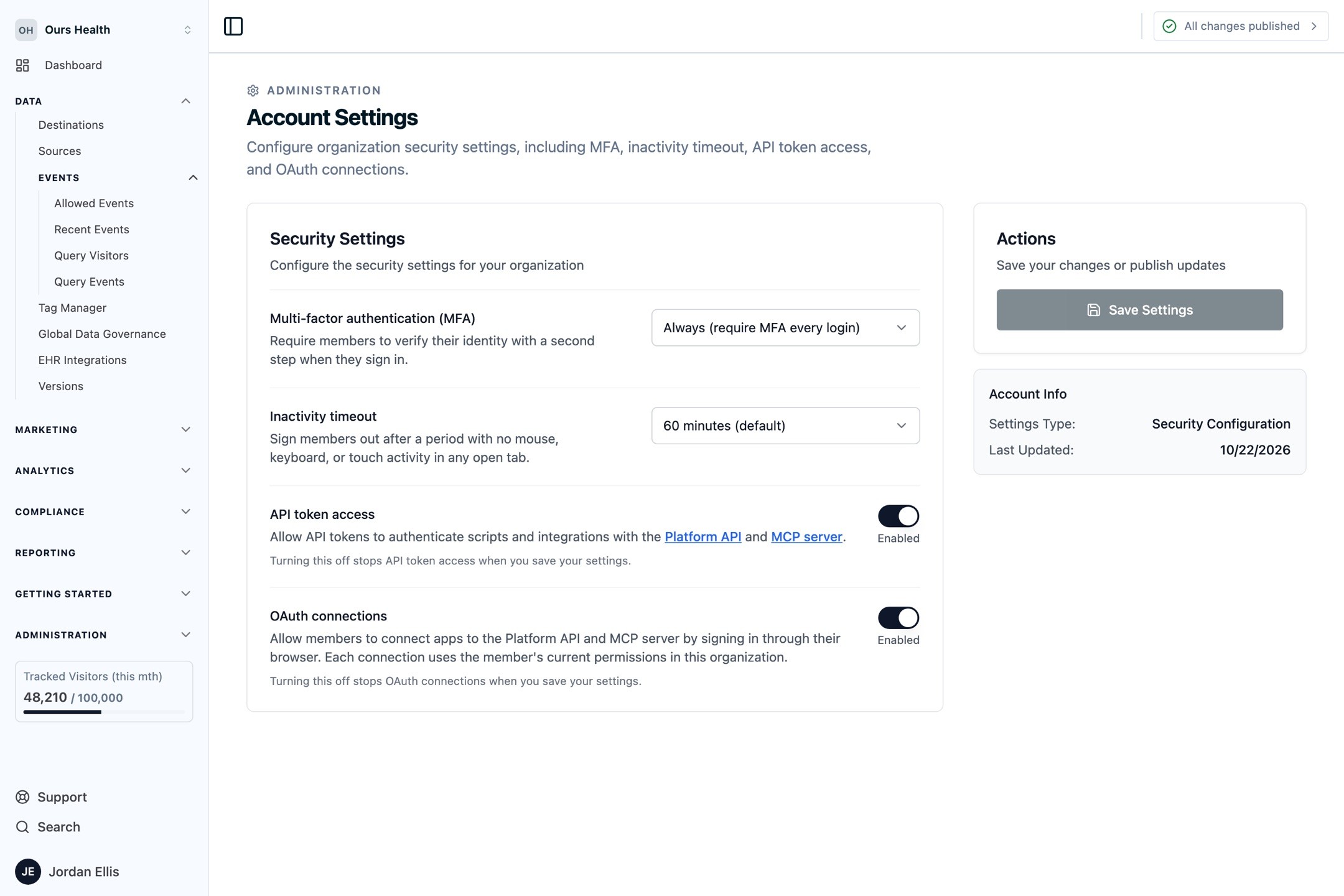
Account Settings with the API token access and OAuth connections switches, each with a description and an Enabled state
The flow is standard authorization code with PKCE, and the consent screen is the same sign-in you already use. Every call made through a connection lands in the audit log with the credential type, the client, the person, and the resource, so a question about what an agent did has the same answer as a question about what a person did.
Importantly, there are no Ours-specific OAuth scopes. A connection carries a member's full current permissions, including writes, and cannot be narrowed below them. That is deliberate: OAuth here is "act as this person," and a person's permissions are already the thing your administrators manage. When you want a credential narrower than a person, use a read-only API key, or create a member with a limited role and connect as them. We verified the connector flow with Claude. ChatGPT, Codex, Claude Code, and Cursor connect with API keys today. (MCP server, authentication)
API keys got better too. Members with the Manage API Keys permission can now open the API Keys page themselves, see and revoke the keys they created, and pick from only the scopes they hold. A key is checked against its creator's current permissions on every request, and a key whose creator is locked or banned stops working. A new credential identity endpoint tells any client which organization and permissions a key or token carries and when it expires. Make it the first call in any script. (Credential identity)
Two more pieces for people automating against us. You can send a test event over REST and read it back, including the exact payload each destination received and whether it succeeded. Test events use the source's live token and can deliver real data, so point them at a sandbox or a test destination. And the versions endpoint reports whether a single entity is added, modified, or removed in the current draft, so a deploy script can check one destination instead of diffing the whole version. (Test events, versions)
Warnings 15, 7, and 1 days before an API key expires, by email and in-app, are in beta. Request access.
The Chrome Extension Sees Your Site the Way We Do
The Ours Privacy Chrome extension adds a Tag Manager panel to Chrome DevTools. It has been the place to watch tags fire on a page. In October, it became the place to watch everything the SDK does on a page and to change what it does before anyone else sees it.
Preview unpublished tags on your live site. Select Preview in the tag manager, enter a URL on your site, and the page opens with your draft container instead of the published one. The grant is signed, lasts an hour, and is stripped from the URL before any tag runs. It works on a container that has never been published, so a brand new setup can be checked against the real page before the first publish. The page shows a Draft preview pill with an Exit button while you are in it. One caution the dialog itself gives you: preview tags can send real events, so keep a test destination in the loop. (Preview Mode)
Every tag reports what happened to it. A tag that fired says fired. A tag that was blocked says blocked, and by what, such as a consent rule or a fire limit. A tag that threw says errored. Delayed tags report their real outcome once they have one. The history follows the browser tab, so a visit that crosses from your marketing site to your scheduling subdomain stays in one timeline, and each route change in a single-page app gets its own row.
A CDP events tab. The panel now lists the track, identify, and page calls the SDK attempted from this browser, with their payloads, a Debug mode badge where it applies, and a link from each event into Query Events in the dashboard. The panel shows what the browser sent. It does not confirm what we received, and the panel says so on screen. For the receiving side, follow the link.
Build an experiment by clicking on the page. The Experiments tab mirrors the dashboard's Create Experiment page. Select Pick Element, choose something on your live page, and change its text, style, attributes, or HTML, or insert, move, hide, or redirect. Preview the variant in place. When it looks right, Open in Ours lands you on a pre-filled Create Experiment page with the name, the page targeting, the variants, and the traffic split, saved as a draft. You still choose the goal and start it yourself. (Point-and-click editing)

The Chrome extension's CDP events tab listing page, identify, and track calls from a visit, with the selected event's properties and a link to find it in Query Events
The Web Scanner Checks the Banner and Watches the Requests
A Reject all button is a promise to your visitor. Whether the site keeps it depends on which scripts still fire after the click. The Web Scanner now checks that on every full scan.

Four consent states, every scan. The scanner loads your homepage four times in four clean browsers: before any choice, after Reject all, after Accept all, and with Global Privacy Control switched on. For each state you get the third-party hosts contacted, the cookies set, and the storage keys written, with findings in plain words such as "Contacted after Reject all." The Reject all and Accept all states work on sites running Ours Privacy Consent Management, since the scanner drives those choices through the consent script on the page. The before-any-choice and Global Privacy Control captures work on any site. A clean result establishes that the homepage honored those choices on that day, from the scanner's network location. It does not establish compliance for the whole site, and a contacted host may be strictly necessary. (Consent checks)

The Consent tab on a scan result, with the four capture states, the hosts contacted in each, and a finding that two hosts were contacted before any choice and again after Reject all
Data observed. The vendor list tells you who was contacted. Data observed tells you what the request carried when it left. The scanner inspects the query strings, request bodies, and URL paths of every third-party request for eleven categories: email, phone, Social Security number, card number, date of birth, public IP address, medical record number, health plan ID, diagnosis, medication, and health condition. A match shows the category, where in the request it appeared, and the field name it traveled under. You never see the value, and we don't store it. Detection is pattern based, so misses and false positives both happen, and the scanner does not fill in or submit forms. Data a visitor types into an intake form and sends on submit is outside what a page-load scan can see. (Data observed)
Verify a page. You remove a tag on Tuesday and the next crawl is Sunday. Verify a page checks one URL right now and compares the result with the previous check of the same page, naming hosts rather than counting them. A tracker that happened not to load this time is called out on its own as "did not load at all this time," so an intermittent script is not mistaken for a fix. A verification never touches the monitor-wide results or the schedule. (Verify a page)
Behind the login. Authenticated scanning gets the scanner onto the portal and the signed-in scheduling flow, in beta and over the API. You supply a credential as headers or cookies, valid for one to twenty-four hours and used for one scan. The scanner does not log in, fill in a form, complete multi-factor authentication, or keep a session between runs. I would rather hand you that small amount of plumbing than hold a standing login to your patient portal on our side. (Authenticated scanning)
Two more pieces sit in the AI analysis beta. The privacy policy analysis now reads your published destination configuration against the policy and lists direct contradictions as destination policy mismatches. Page Insights reviews any captured page through Conversion, SEO, Accessibility, and AI Readiness lenses, with the deterministic checks and the model-written suggestions kept visibly separate. Request access for either.
A browser scan still cannot see a server-to-server connection, so a Conversions API call from your backend to an ad platform belongs in a destination configuration review rather than a scan.
Also New
Lookup Table and RegEx Table variables. A Lookup Table maps an exact input value to an output with a fallback. A RegEx Table matches ordered patterns and supports capture groups, so one variable can turn forty landing-page paths into a dozen service lines. Click triggers also gained a "does not match CSS selector" condition. (Variables)
Experiment goals that count only when properties match. A goal can now be form_submitted where the form is the appointment form, and a goal can accept any of several event-and-filter options. The filter applies to totals, the daily series, and the statistics. Goals also work over the public MCP with stable IDs. (Goals)
More experiment controls. Explain result writes a short brief of the primary result with links to the evidence behind it, and marks itself stale if the result moves (AI beta, request access). Targeting accepts geo.zip, geo.dma, and geo.dma_name, typed in by hand for now, plus a Match empty value option. The seven-day wait for outcomes is opt-in per experiment, so a test with instant conversions no longer sits in Finalizing outcomes for a week.
Audience syncs to Mailchimp and Braze. Build an audience once and keep a Mailchimp tag or a Braze custom attribute current with a daily membership update, the same way the Meta and Google syncs work. Both are in beta. (Mailchimp Audience Tags, Braze Audiences)
Three new destinations, in beta. Gravity Conversions API sends conversions to ads placed inside AI apps and captures Gravity's click ID on its own. LeadSquared creates or updates a lead or posts a lead activity; confirm a Business Associate Agreement with them before sending health data. Reddit CAPI v3 replaces the API Reddit has deprecated, with phone and event source URL support. (Gravity, LeadSquared, Reddit CAPI v3)
Better behavior from destinations you have. Amazon DSP and Roku honor Limited Data Use: a flagged event is dropped for Amazon and restricted for Roku. OpenAI Ads accepts hashed email and external ID for matching. Klaviyo mappings can update profile properties rather than the event. Customer.io records anonymous page views. TikTok gained a Content ID field for catalog ads. (Amazon DSP, Roku, Klaviyo, Customer.io)
Destination administration. Destination History collapses versions where nothing changed, links from each destination, and exports to PDF. An event rename can be copied to another destination. Destination settings now warn when the destination sits in no Global Data Governance category, and custom visitor properties can be used in governance conditions. Publishing is blocked until every web source has allowed domains, with the domains we have observed suggested for you. (Destination History, Domain allowlisting, Global Data Governance)
Smaller scanner work. Content Security Policies set in a meta tag are read, where they used to show as no policy. New scanners default to 1,000 URLs, and the rescan cooldown is gone for monitors under 5,000 URLs. Alerts stopped treating an incomplete crawl as a baseline, the monthly digest is one email per organization, and every alert link opens the scan that triggered it. The public MCP server can create a scanner, read the queue of hosts that need a decision, and resolve a coverage gap by writing an exact-host suppression rule after you confirm. (Configuration, MCP server)
Short links forward campaign tags. Turn on Forward campaign tags to destination and a link's campaign values are appended to the destination URL as UTM parameters, with any UTMs already on the URL taking priority. Clicks are tagged in Ours Privacy reporting either way. (Campaigns and UTMs)
Video: captions in other languages and an adaptive player. Set a video's source language at upload, then machine-translate its captions or upload a professional translation per language, and the player picks the track that matches the viewer's browser. Caption files are public, so keep protected health information out of them. A new adaptive embed streams from 360p to 1080p with a quality menu, for videos uploaded from now on. (Captions and transcripts, embed configuration)
User management. Administrators can unlock a locked-out member and reset their two-factor authentication. The member list shows Last Active and Joined, with filters for inactive 30 days, inactive 90 days, and never signed in.
Data retention requests from the app. Request a retention period of 3, 6, 12, or 24 months under Advanced Features, and we process it. The event replay request form also takes an optional date range. (Data retention, event replay)
What's Next
Self-serve screens for Reverse ETL and Scheduled Reports, so the setup your account team does today becomes a page you fill in. More warehouse sources behind the same allowlist model. Consent checks on the pages that matter most, including the ones behind a login, since the homepage is where the check starts rather than where it ends. A connected-apps list for OAuth is on the list too, so you can see and disconnect individual connections from our side rather than from the client.
If you have a warehouse table that should be feeding your destinations, a partner waiting on a data feed, or a consent banner you have never tested, book a demo and we will set it up with you.
Related Articles
Newsletter
Stay up to date
Subscribe for privacy news, feature updates, events, etc.
