Product
Platform Updates: Video Channels, Caption Editing, and Caption Vocabulary

Video rarely arrives one file at a time. A patient education library or a recorded webinar series is a collection a visitor wants to browse, and the words spoken in it are the ones automatic transcription has never heard: provider surnames, program names, medications. This release covers the collection and the words in it. Here's what's new:
Video Channels
A channel is a set of videos published together as one branded page. It gets its own URL and its own embed code, so a library of any size is one thing to place on your site rather than one embed per video. Assign a new video to the channel, and the page updates without anyone opening your CMS.
What's new:
One embed for a whole library. Link to the channel URL when the library is its own destination, or paste the channel embed code to put it inside your own layout. Both render a searchable grid of posters, titles, and durations.
Your branding, your order. Set a channel name, a description, a brand color, a logo, and footer text, then arrange the videos in the sequence you want people to see them in.
Assemble before you publish. A channel stays private until you publish it. A video can sit in several channels at once, in a different position in each, and keep its own standalone embed code.
Controls that belong to the visitor. Search across titles and descriptions, a grid or list layout, and a light, dark, or match-system theme. None of those choices are saved or tracked.

Building a video library page yourself means a listing view, a router, a player layout, and a way for a marketer to add a video without a deploy. A channel is that page, on a URL you can hand to anyone, hosted the same way individual videos are: no consumer video platform in the page, no third party receiving your visitor's IP address or watch behavior. Opened directly, a channel page sets no cookies and loads no tracking, so it needs no consent banner of its own. Embedded in your site, video analytics flow through the consent manager you already run. Check out the Video Channels docs for more details.
Captions You Correct and Terms You Teach Once
Every video you upload is transcribed to English automatically, and the player picks the caption file up on its own. Automatic transcription handles everyday speech well and struggles with words it has never seen, which in healthcare is most of the words that matter: provider surnames, facility and program names, procedures, medications, etc.
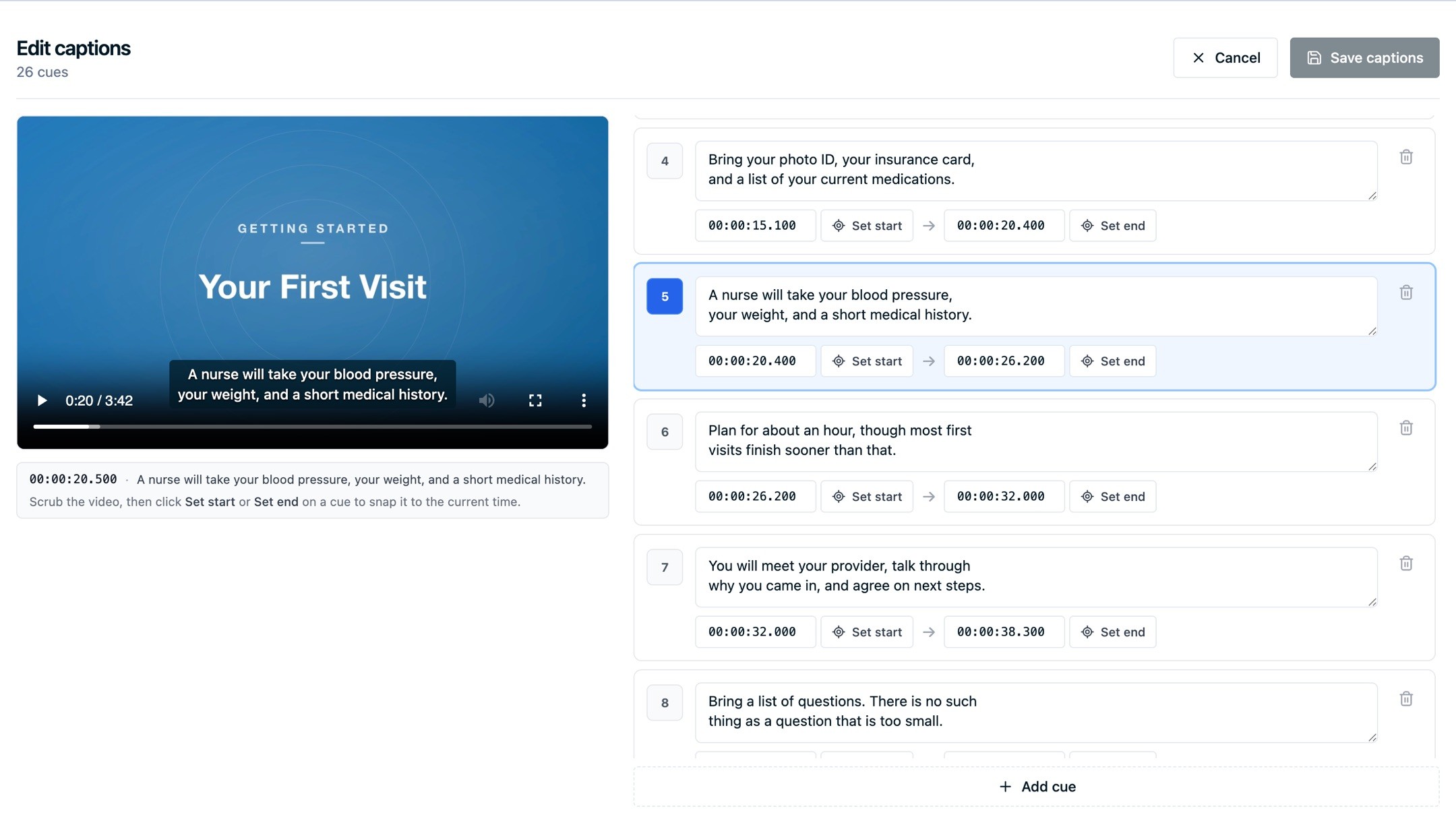
You can now fix those captions in the dashboard. Open a video, choose Edit captions, and the video sits above its cue list with the active cue highlighted as it plays. Correct a line's text in place. Type a timestamp, or park the playhead at the right moment and set the start or end from there. Add a line the transcription missed, delete a stray one, and save. Saving replaces the file the player serves from that point on.
Fixing the same misheard surname on twelve videos is a poor use of an afternoon, so Caption Vocabulary handles the repeat offenders once. Enter your terms one per line, save, and uploads from a few minutes later are transcribed with them. The list is shared across your whole account, and your organization's name is in it already. It applies to new uploads rather than re-captioning what you have uploaded before, and it holds transcription configuration, so be sure to keep patient names and anything else protected out of it.
Healthcare and public-sector sites are often held to WCAG Level AA, and video is one of the first places an accessibility review looks. The player conforms to WCAG 2.2 Level AA and Section 508, its controls are keyboard operable and labeled for screen readers, and the dashboard checks your chosen player color against a 4.5:1 contrast minimum before you publish. That leaves the captions, and a track that gets a drug name wrong is worse than no track at all for a viewer who depends on it. More info here on Captions and transcripts, Caption vocabulary, and player accessibility.
Also New
A few smaller video updates.
Loop in the embed player. Looping is a checkbox in the embed settings beside autoplay and controls, which covers the short background clip on a hero section without building a player for it. Motion that never stops carries accessibility consequences, so keep the controls visible and the loop short. Looping also leaves your engagement numbers alone: the player reports one completion for the first full pass and stays quiet on later ones. (Embed configuration)
Your video count, on the page. The Videos list and the upload screen both show how many videos you have used against your account limit and how many slots are left, so you can size a bulk upload before you start it. Drag in a batch that would take you past the limit and the files that fit go up, with a message telling you how many were skipped. (Uploading videos)
Embeds on your own verified domain. With a custom domain configured, the domain selector above the embed snippet generates a player that serves both itself and the video files from your domain. Every request stays on your domain, which matters when your site blocks content loaded from anywhere else. (Embedding videos)
Screenshots throughout the video docs. Every video documentation page that describes a screen now shows it: the library, the caption editor, the embed settings, the analytics report, the vocabulary dialog. (Video docs)
What's Next
Playback inside a channel reports per video today, the same as any other embed, so Video Analytics lists the videos individually rather than the channel as a unit. Channel-level reporting is the next piece of video work we are looking at. Customer-authored transforms in the data mapper are still in flight too, so writing your own field modifications instead of picking from a fixed set is coming.
If you have a video library sitting on a consumer platform and you want it on your own domain instead, book a demo and we will walk through what moving it looks like.
Related Articles
Newsletter
Stay up to date
Subscribe for privacy news, feature updates, events, etc.
