Product
Platform Updates: Video Analytics, Web Analytics Filtering, and Google Tag Manager Event Settings

Healthcare marketing teams are doing more with their content than ever, and Ours Privacy is upgrading video and web analytics to match. This release brings two meaningful upgrades: Video Analytics, a full analytics layer for every video you're serving on your site, and a significantly faster Web Analytics dashboard with click-to-filter so you can explore your traffic from any angle without ever leaving the platform.
These updates are about speed and clarity. Questions your team has been asking (how are patients engaging with our video content? which campaign drove this segment of visitors?) now have answers a few clicks away, directly alongside the rest of your first-party marketing data.
Here's what's new:
Video Analytics
Video is one of the most powerful tools in a healthcare marketer's content mix, and now you have built-in HIPAA-safe analytics to understand exactly how it's performing. Video Analytics brings your video data directly into Ours Privacy, so you can see how every video on your site is performing alongside the rest of your first-party marketing data.
What it shows:
Overview metrics: Total plays, total watch time, average watch time, and average completion rate across all your videos, with a time series chart showing trends over any date range
Per-video breakdown: A table of every video tracked on your site with plays, average watch time, and completion rate for each one
Video-level drill-down: Click into any video to see its full analytics in isolation, including play count over time, watch time distribution, completion rate trend, and engagement detail
Time granularity: View data by day, week, or month depending on the time range you set
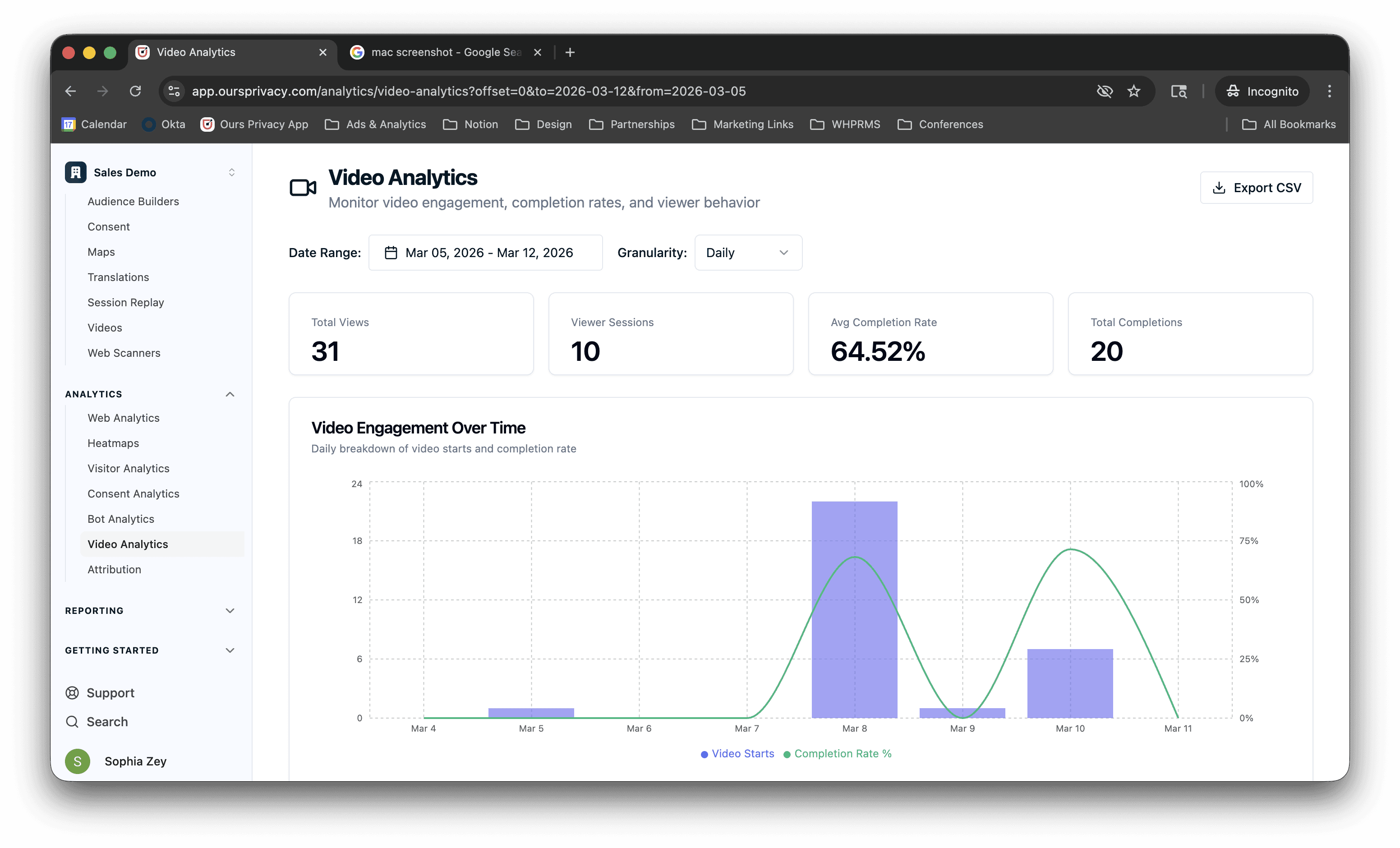
Video Analytics tracks your actual video content, not just a pageview on a page that happens to have a video. If a visitor starts watching but drops off at 30%, you see that. If one video consistently outperforms others on the same page, you see that. If completion rate varies by traffic source, you can cross-reference with Attribution. The data exists in the same platform as your events, consent records, and session replays, so the full picture is there when you need it.
Video Analytics is available to all accounts with the Videos product enabled.
Web Analytics: Faster Queries and Click-to-Filter
In our last update we mentioned that web analytics was moving to a new query engine. That work is done. The result is a significantly faster dashboard and a new filtering experience that makes it easy to drill into your traffic from any angle.
What changed:
Faster queries: The same dashboard you already use loads much faster. Unique visitors, pageviews, bounce rate, session duration, top pages, top sources, top locations, and device breakdowns all benefit from the new backend
Hourly data refresh: Web analytics data updates on the hour, so you're working with recent data even for same-day analysis
Click-to-filter: Click any row in any breakdown and it becomes an active filter across the entire dashboard. Click a browser in the Devices section, and every metric and breakdown on the page scopes to just that browser. Click a UTM term in the Sources section and the whole dashboard narrows to traffic from that campaign. Filters stack, so you can layer UTM term, country, and browser and everything updates together
Filter chips with clear-all: Active filters show as chips at the top of the dashboard. Remove one at a time or clear all at once
Drill-down detail views: Every breakdown section has a "View details" link that opens a full table with search, so you can go from "top 5 pages" to the complete list and filter within it
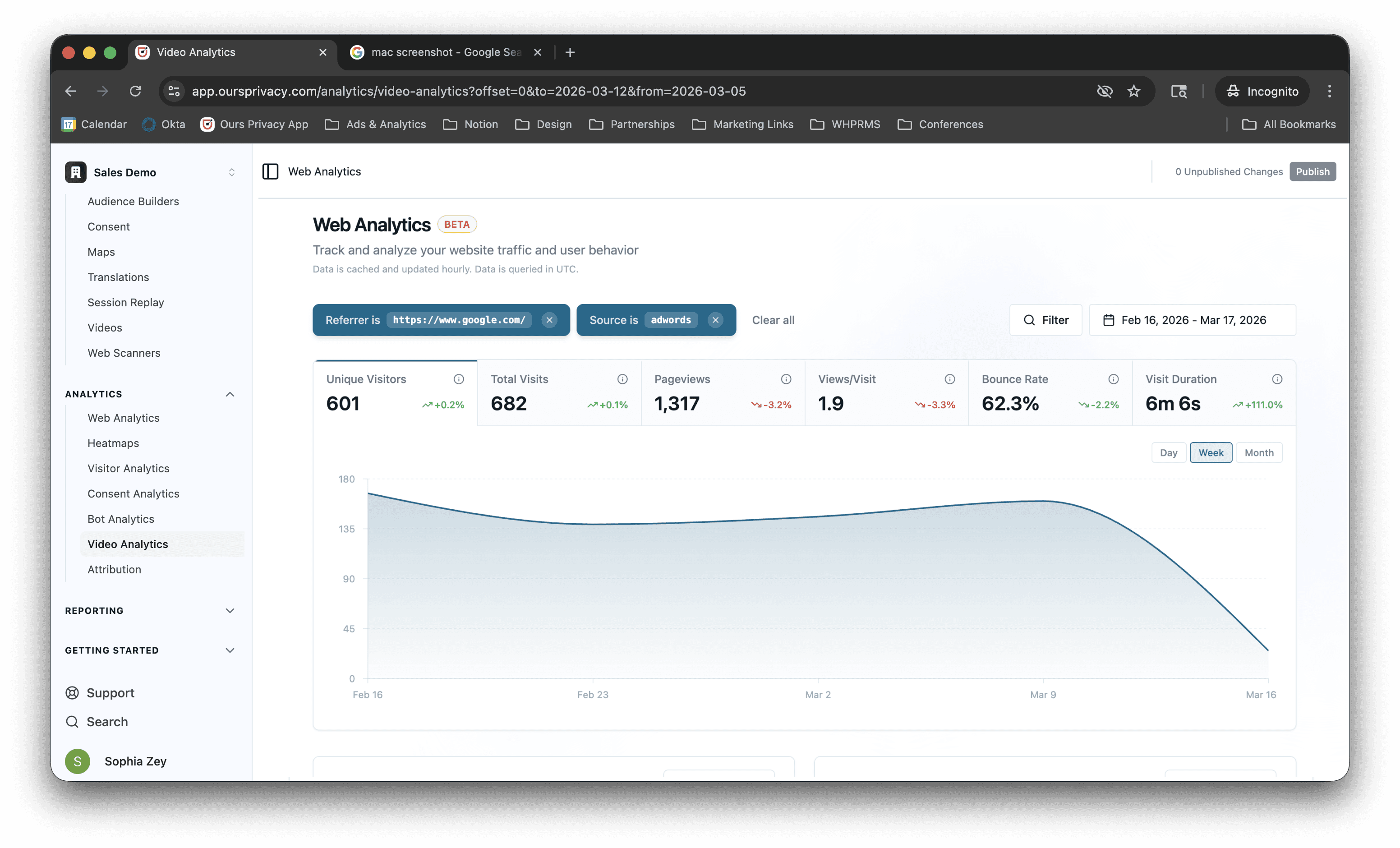
The interaction model is designed for exploration. You notice Chrome has a higher bounce rate than Mobile Safari. Click Chrome, see what pages those visitors hit, click the highest-exit page, see which sources drove them there. All of that without exporting anything or writing a query.
Web Analytics is currently in beta. If you don't have access yet, reach out to your CSM.
Google Tag Manager: Event Settings Objects
For most teams, we recommend using the Ours Privacy tag manager directly. It's faster to configure, tighter in scope, and built specifically for HIPAA-compliant healthcare marketing workflows. But for teams already running Google Tag Manager as part of their setup, the Ours Privacy GTM integration just got more capable.
The GTM integration now supports passing event settings objects and custom objects as event properties and default event properties. Previously, event properties were limited to individual values, so if your GTM configuration used an event settings variable (a named group of parameters applied across multiple tags), you'd have to unpack it property by property before passing it through.
Now you can pass the object directly. The integration reads the full structure and maps it through to your event properties, which makes it much easier to keep your GTM configuration in sync with your Ours Privacy events without duplicating work.
What's Next
Web Analytics will keep improving as we move it toward general availability. More filter dimensions, cross-linking into session replays and heatmaps, and tighter integration with Attribution are on the roadmap.
Video Analytics is the first version. Watch time distribution, per-segment completion rates, and integration with Audience Builder are coming.
For setup and technical details, see our documentation.
Want to see any of this in action? Book a demo.
Related Articles
Newsletter
Stay up to date
Subscribe for privacy news, feature updates, events, etc.
