Product
Platform Updates: Compliance Progress Over Time, and Alerts That Come to You

Two things in this release come down to the same idea: staying on top of what matters should be easy, without constant dashboard checks. Your compliance posture should be a story you can scroll back through at any time, and you should be proactively notified of the signals worth acting on.
Here's what’s new:
See Your Progress, and Let the Signals Find You
Both of these updates build on the same idea: staying informed shouldn’t depend on you being in the right place at the right time. Reporting has shown you the current moment, and signals worth acting on have lived exclusively in dashboards you have had to actively check.
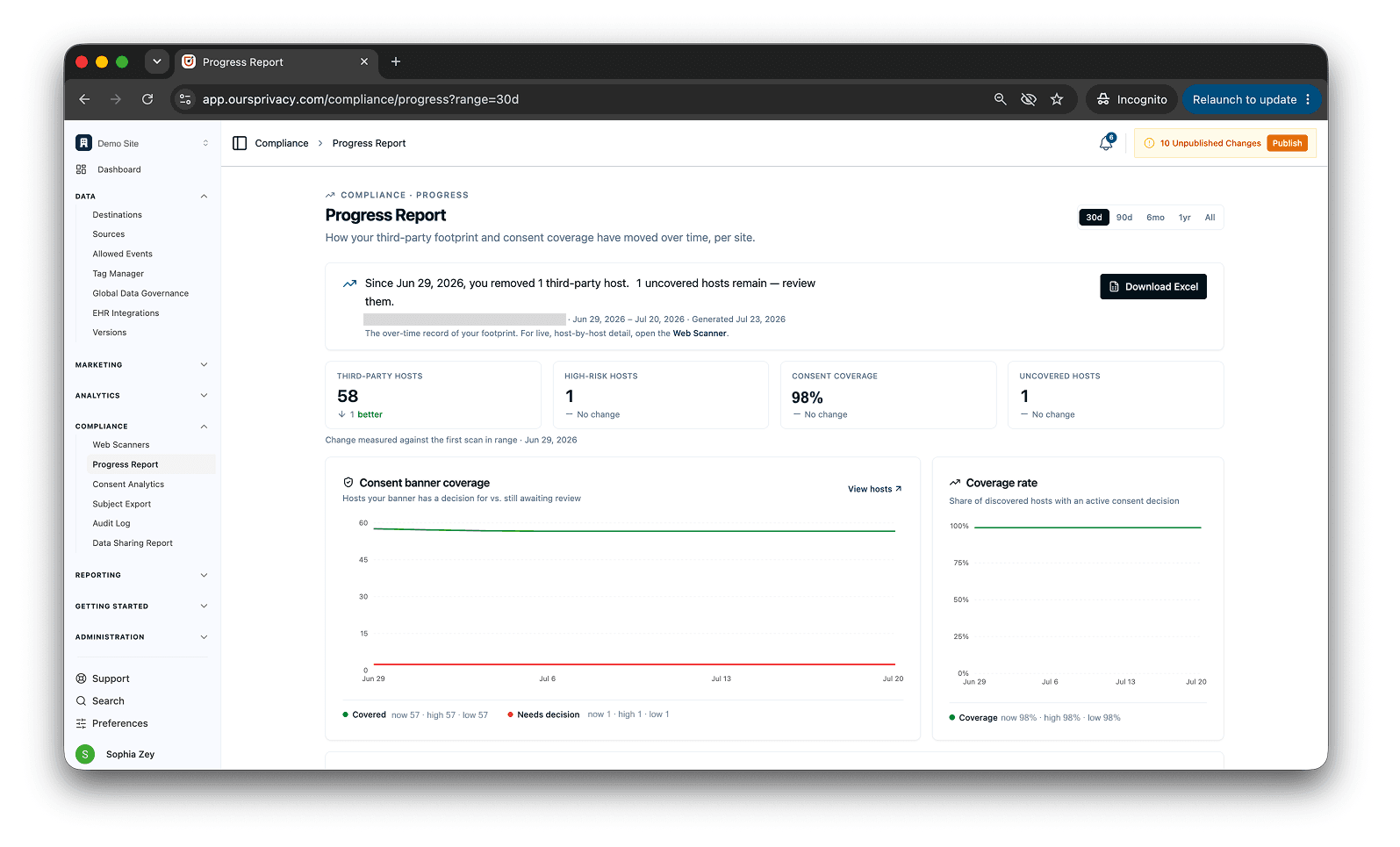
With this update, the Web Scanner now keeps a history you can scroll back through. Pick a date range and watch your posture move over time: trackers removed, cookies cleaned up, coverage trending up, findings resolved. A prospect on a sales call asked for exactly this, a way to show off the compliance work they had done as a progress report card. The scanner already snapshots every crawl, so the history was there to surface. Instead of a single current number, you get the story behind it, which is what a team actually wants to put in front of a buyer, an auditor, or their own leadership.
And the signals that used to sit on a dashboard now come to you. A saved funnel's conversion rate slips past a threshold. Tracked event volume falls off against its recent baseline. An event that was firing goes quiet. A new or newly-risky script lands on a checkout or login page. Any of these now reaches you directly.
And you can now turn on optional notifications that send the signals that used to sit in a dashboard directly to your inbox, app, or a webhook. You can get pinged when:
a saved funnel's conversion rate slips past a threshold
tracked event volume falls off against its recent baseline
an event that was firing goes quiet
a new or newly-risky script lands on a checkout or login page
Any of these now reaches you directly.
What's new:
Funnel metric change: Get alerted when a saved funnel's conversion rate shifts beyond a threshold, so a drop in your signup or checkout flow reaches you the day it happens, not when you next open the report.
Event volume drop: When tracked event volume falls off against its recent baseline, or an active event stops firing entirely, you hear about it before it shows up as degraded ad-platform performance days later. An agency running many clients can rely on this per account, so a silent break surfaces in hours.
New and high-risk scripts: When a scan detects a script that is new or has escalated in risk, especially on sensitive routes like checkout, payment, or login, you get a near-real-time alert rather than waiting for the next digest. For a security or compliance owner, "a brand-new script just appeared on the payment page" is the signal worth interrupting for.
Route any of these to email, in-app, or a webhook, and choose who receives which. Microsoft Teams delivery is on the way, joining the existing channels. Both halves of this update make the same point: you can easily stay on top of your posture and data without having to hunt down information. Web Scanner docs and notifications docs.
Also New
A few more updates that widen your reach and tighten control.
A global Allowed Events Center. Managing the events you collect used to mean working destination by destination. There is now one screen for all of it: add, delete, and edit events, point an event at a new destination, rename across destinations in bulk, and see which events have a tag manager tag firing them. Each event also has a "View Code" action that shows the exact SDK call to send it, so a non-developer can copy it and hand it to their developer. (Allowed events docs)
Pre-built consent variables in the tag manager. Reading consent state into your tags used to mean writing your own custom JavaScript. Now the current consent state is exposed as pre-made variables you can select and pass into any tag or trigger, however your setup needs them. Reference a category directly to gate a tag on it, without hand-rolling the logic yourself. (Tag manager consent variables)
Google Data Manager destination. You can now send data to Google Data Manager, Google's current path for getting conversions and audience signals into Google Ads. It runs server-side under the same consent rules and identity graph as the rest of your stack. (Google Data Manager docs)
What's Next
Next up is customer-authored transforms in the data mapper. Today you map a field and pick from a fixed set of modifications. Soon you will be able to write your own: rename a messy inbound event to your convention, build a value from more than one field, and normalize data as it flows through, all without waiting on us. Putting the tools to shape your data in your own hands is central to the CDP we are building toward.
If there is a workflow you are still stitching together from separate tools, tell us. That gap is usually the next thing we build. If you want a walkthrough of the new alerts or the compliance progress report against your own data, book a demo.
Related Articles
Newsletter
Stay up to date
Subscribe for privacy news, feature updates, events, etc.
