Product
Platform Updates: The AI Assistant and Dashboards, and Also Mobile Analytics


Two questions follow every analytics review I sit in on. The first is "why?" A funnel shows the drop-off, a chart shows the dip, and the person who built the report gets asked what happened and what to do about it. The second is "can you send me that?" The report lives in the product, the meeting lives in a conference room, and someone spends Monday morning pasting screenshots into a deck.
This release answers both. The AI Assistant answers "why" from inside your own data, on every screen, and it sees only what your role lets you open. Dashboards answer "can you send me that" with a page you build yourself, your logo on it, and a Present button. And since the same pipeline has been carrying your mobile app events all along, Mobile Analytics gives those apps a report of their own. Here's what's new:
The AI Assistant
The AI Assistant is an analyst and a setup engineer on every screen of Ours Privacy, with your reports, mappings, destinations, and scans in reach. Ask it in plain language. It works as you, so it can only read what your role can open, and every answer cites its sources.
Your permissions decide what it can see. Every read runs through the same permission-checked API as the Ours Privacy app, so an answer can only contain what your role can open. You control AI access with the roles you already manage. Give a service-line marketer analytics access and nothing else, and their AI Assistant is an analyst that has never seen a destination. Give a compliance lead consent, scanner, and version access, and theirs is a reviewer that cannot read a single event. Narrow a member's role and their AI Assistant narrows on the next message. You decide, person by person, what data AI can reach, and the AI Assistant cannot widen that scope. It reads and explains. You make changes on the page that owns them.
Ask what moved, why, and where people stall. The AI Assistant reads the same events that power Insights, Journeys, Funnels, Heatmaps, Experiments, and Consent Analytics, and it connects them. It finds the step where intake stalls and shows what people did instead. The events it reads include the ones your website never saw: the appointment outcome from your EHR export and the call from your call tracking vendor, tied to the person who requested the appointment. It reads months of behavior in one conversation and hands you a CSV when the answer is a table.
"Compare appointment requests this month with last month by service line."
"What do people do right after they complete the eligibility quiz?"
"Where are mobile visitors rage-clicking on the knee-replacement page?"
"Is it safe to call a winner on the consultation CTA experiment?"
"How did the opt-in rate change this quarter compared with last?"
It knows which screen you are on. Open the AI Assistant from a destination, a scan, an experiment, a heatmap, a funnel, or a consent configuration, and "this one" means the one on your screen, with its dates, filters, and device already applied. Floating keeps it in a small window over the report you are reading. Sidebar docks it beside the page. Full screen gives it a page of its own, with your chat history alongside.
Ask about your setup. The other half of what your team needs explained is the data layer. Follow an event from the source that collects it to every destination that receives it, and see what each one gets. Ask which fields your Meta mapping hashes. Ask whether a destination delivered appointment requests in the last 24 hours, and what failed or was blocked. Every change in Ours Privacy is a draft until you publish it, so ask what changes before you publish, down to the field, or compare any two versions. Ask how your patient site's consent configuration handles Global Privacy Control. Open it from a Web Scanner result and ask it to summarize the scan, name the hosts awaiting a decision that set cookies, and propose a decision for each one with its reasoning. The AI Assistant answers those questions because it reads the configuration, the consent record, and the scan alongside your events.
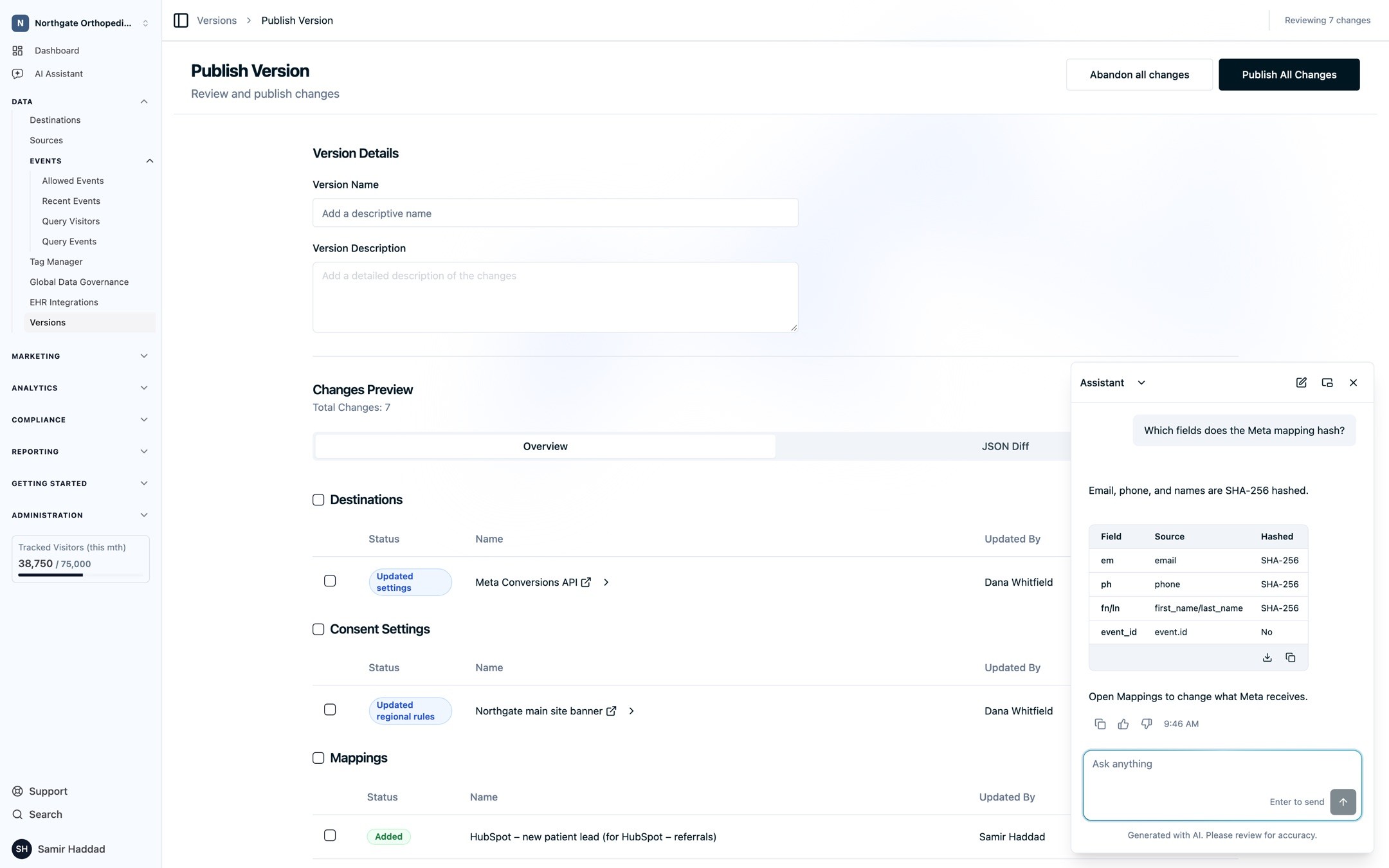
Every answer shows its work. Answers draw on your account's data and the Ours Privacy documentation, and the AI Assistant searches the full docs site, including the API, SDK, and MCP references. The pages it drew on appear under Sources, so you can check the answer and jump to the setting it describes. When a question could go two ways, it asks which you meant before it answers.
Built for a regulated environment. Answers are generated with Claude on Amazon Bedrock inside our own AWS environment, in a runtime with no path to the public internet. Ours Privacy does not use your data to train public AI models, and your Business Associate Agreement covers the AI Assistant.
Or bring your own agent. The same account, with the same permissions, is reachable from the agent you already use. Add the Ours Privacy MCP server as a connector in Claude and sign in with your account, or connect ChatGPT, Cursor, or Claude Code with an API key. Your agent then reads your funnels, your mappings, your scans, and your consent configuration, builds dashboards, and verifies a page after a change, all as you, with every call checked against your current permissions and written to the audit log. The AI Assistant and your own agent share one permission model, so a role change applies to both on the next request.
We turn on the AI Assistant per account. Request access, or ask your account team. (AI Assistant, asking about analytics, reviewing your setup, privacy and permissions, MCP server)
Dashboards
It is your data. Dashboards let you read it the way you want to, build the report yourself from the Insights, Funnels, and Journeys your team already trusts, and walk into the meeting with it.
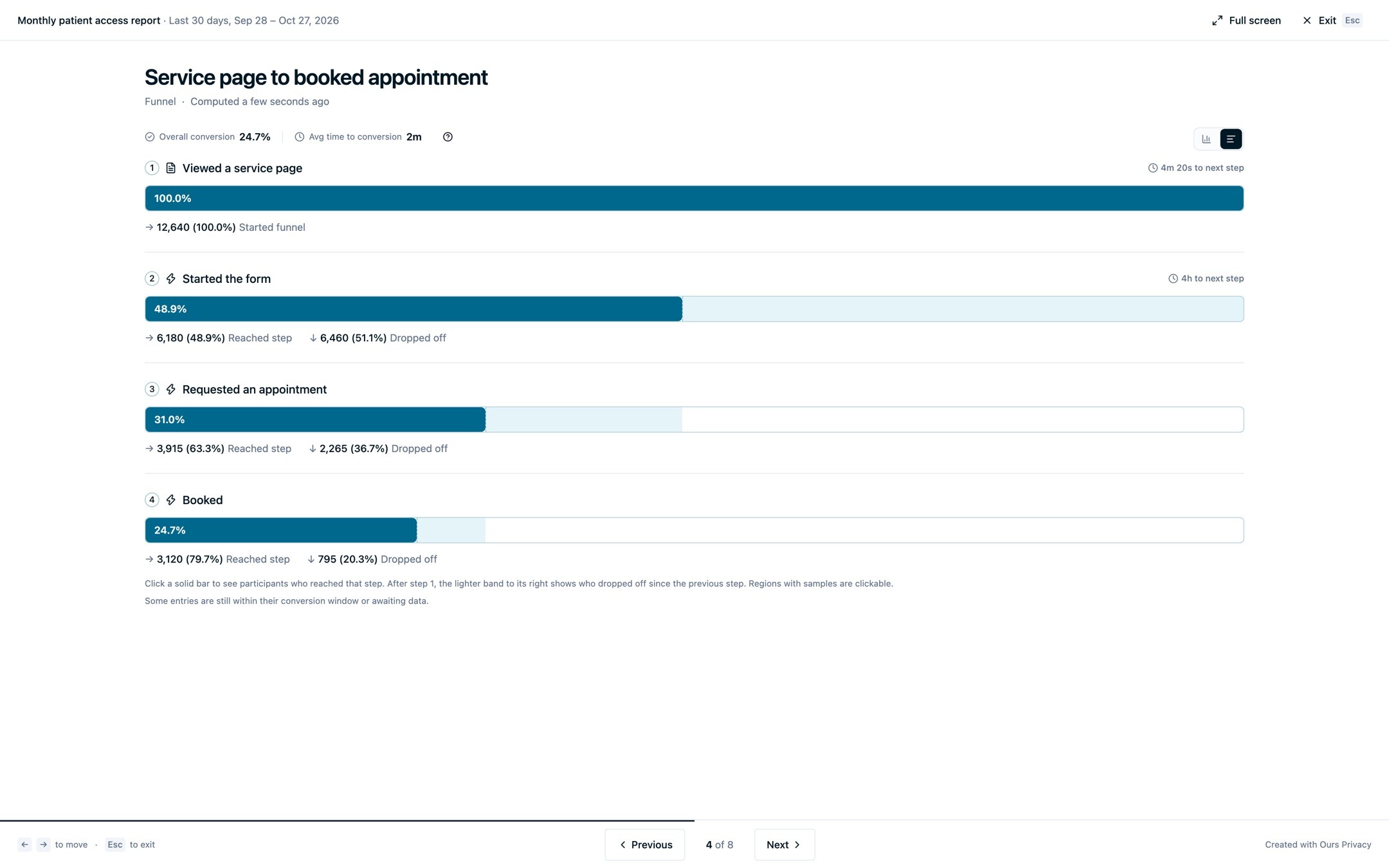
Present it. Open a dashboard and select Present. The first slide carries the dashboard's name, its dates, and its filters. Every tile after that is a slide of its own, full screen, with the arrow keys to move. A link opens straight into the presentation, so the person running the meeting never sees an edit button. Export PDF produces the same report as a file, in the on-screen layout with native charts, your text as text, and your replay lists as tables. A dashboard never grants access to a report its viewer could not already open, and read-only viewers can change the dates, apply a filter, present, and export without moving anything, so the page a service-line leader opens on Monday looks the way you left it.
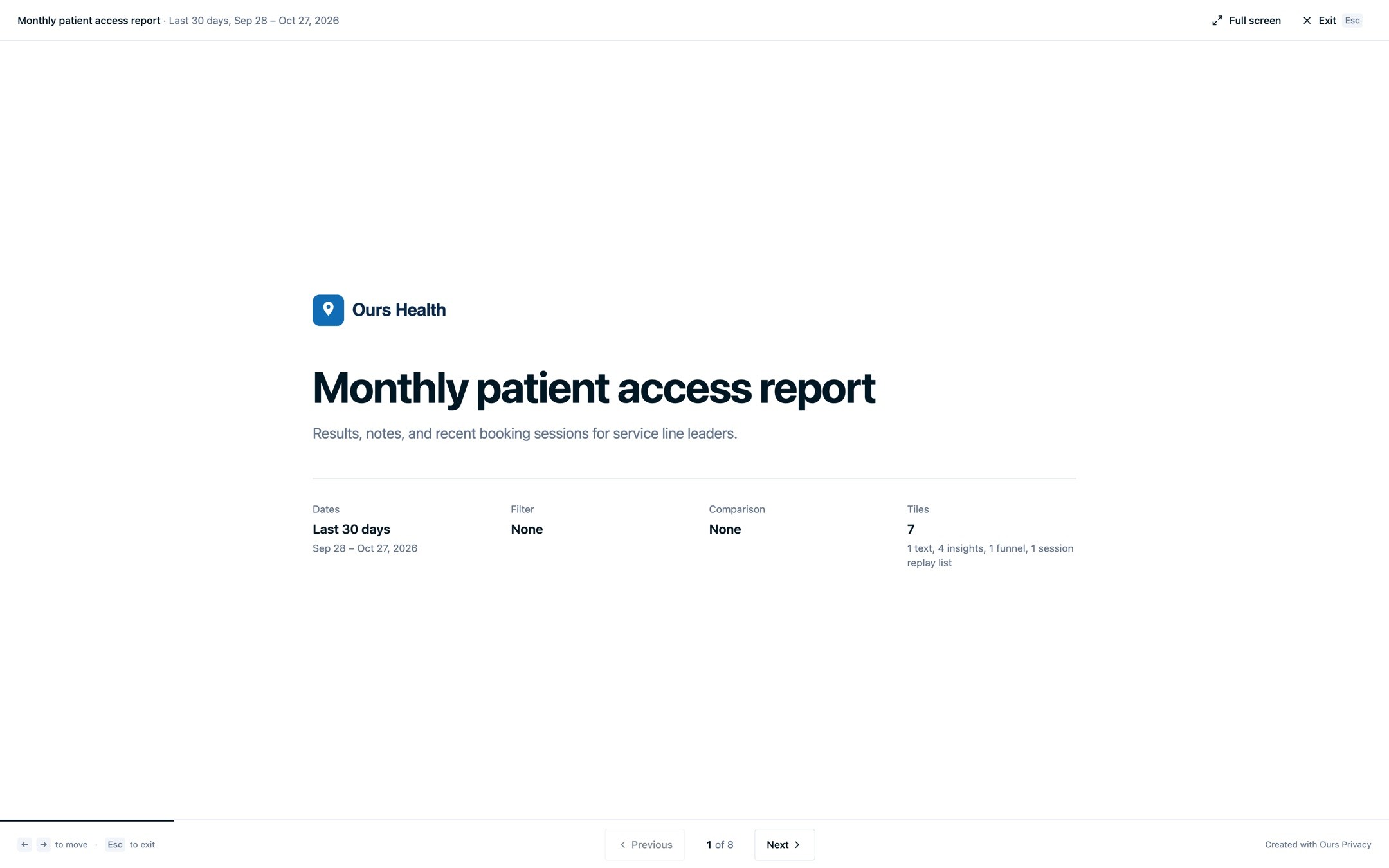
Your logo, on everything. Report Branding, under Settings, holds your organization's logo. It appears on every dashboard, in every PDF header, and on every presentation title slide. A client report from an agency looks like the client's report. A service-line review looks like the health system's review.
Build it the way you read it. A dashboard holds up to 12 tiles of three kinds. Saved reports are your own Insights, Funnels, and Journeys, with the definition your team agreed on. Text tiles are written in place, with a live preview, for the summary at the top and the note that explains a number. Session replay tiles list the latest recordings that match an event, a page, and any filter, so the funnel's drop-off sits beside ten sessions where you can watch it happen. One date range and one set of filters apply to every tile, and Compare shows the previous period or the previous year. Drag to reorder. Drag an edge to resize on a 12-column grid. Every Insight, Funnel, and Journey has Add to dashboard in its menu, and so does the Session Replay list.

Numbers you can stand behind. Your 90-day comparison is only as good as the identity under it. Server-set cookies on your own domain, plus email and phone matching for the systems that never had a web identity, mean the same person is the same person in October and in January, on Safari too. The funnel on the slide counts people, and the comparison in the corner compares the same people.
Defaults out of the box. The Overview page, Web Analytics, Mobile Analytics, Attribution, and the Calls and Appointments reports are built in and work the day your data arrives. When you want more than the defaults, the Analytics Recipes give you seven dashboards to build tile by tile: a patient access command center, a new-patient engine for a dental group, a joint and spine campaign review, and four more, each with the reports to save, the chart to use, and what to look for every week.
Dashboards, Insights, Funnels, and Journeys are also available over the REST API and the MCP server, so an agency can stamp one dashboard across every client account from a script, and your agent can add a tile to a dashboard from the conversation where it found the number. Dashboards are part of the Analytics Suite. (Dashboards, Report Branding, Analytics Recipes)
And Also Mobile Analytics
The iOS, Android, and React Native SDKs send events into the same pipeline as your website. Mobile Analytics is the report built for those events, under Analytics beside Web Analytics.

Pick one app or all of them. The overview shows active users, new users, app opens, sessions, engaged sessions, engagement time, event volume, and screen views, with a daily chart you can switch between metrics. Top screens and top events open into full tables with search, sort, and a CSV export. App environment breaks the same range down by SDK, platform, operating system, device, and app version, which is the view that answers "did the 4.3 release change anything?" Mobile Analytics is part of the Analytics Suite. (Mobile Analytics)
What's Next
Next, the AI Assistant takes actions you confirm first: build the Insight it previewed, save the comparison it ran, add the result to a dashboard. We are connecting Dashboards to Scheduled Reports, so a dashboard PDF lands in an inbox or a storage bucket on a schedule. Breakdowns for Insights and Journeys, which split a chart or a flow by source, device, or any property, are the most requested Analytics feature and the next one we ship there.
If your Monday report is still a deck of screenshots, book a demo and bring the report.
Related Articles
Newsletter
Stay up to date
Subscribe for privacy news, feature updates, events, etc.
