Product
Platform Updates: Visual Tagger, Data Governance, and Audience Builder Improvements

We've been thinking a lot about data ownership lately. Not in the abstract "your data is important" sense. In the practical sense: who decides what data enters your system? Who controls what gets stored, what gets stripped, and what gets sent downstream? The answer should be you, not your SDK, not your tag manager, and definitely not whoever happens to be firing events at your public endpoints.
That's the thread connecting everything in this release. A Visual Tagger that makes setup faster so you can be intentional about what you track. A Data Governance hub that gives you real control over what data your system even accepts. And Audience Builder improvements that let you filter on consent status easily so governance carries through to activation.
Here's what's new:
Visual Tagger
Setting up event tracking typically means too many tabs, and many iterations of testing, previewing and deploying to make sure event selectors are firing properly. The Visual Tagger makes it easier.
Open the Chrome extension, click the element you want to track, and the tag manager builds the configuration for you.
What it does:
Point-and-click element selection. Activate the Visual Tagger in our Chrome extension, hover over any element on your live site, and click to select it. The page is paused while the tagger is active so clicks don't navigate away or trigger anything.
Smart selector generation. The tagger generates multiple CSS selector candidates and ranks them by stability. It prioritizes durable strategies like
data-*attributes and element IDs, and automatically detects framework-generated IDs (React, Ember, styled-components, CSS modules) that would break on the next build.Stability scoring. Each selector gets a rating: Stable, Fair, or Fragile. You see exactly how reliable your selector is before you save, and the tagger suggests alternatives if your first choice is fragile.
Auto-configured tags and triggers. Once you select an element, the tagger pre-fills the interaction type (click, form submit, page view, or time on page), event name, trigger conditions, and captured properties. Edit anything you want, then save directly to your tag manager.
Tab cycling for overlapping elements. If multiple elements overlap at the click point, press Tab to cycle through them and pick the one you need.
Trigger deduplication. If a matching trigger already exists, the tagger reuses it instead of creating a duplicate.
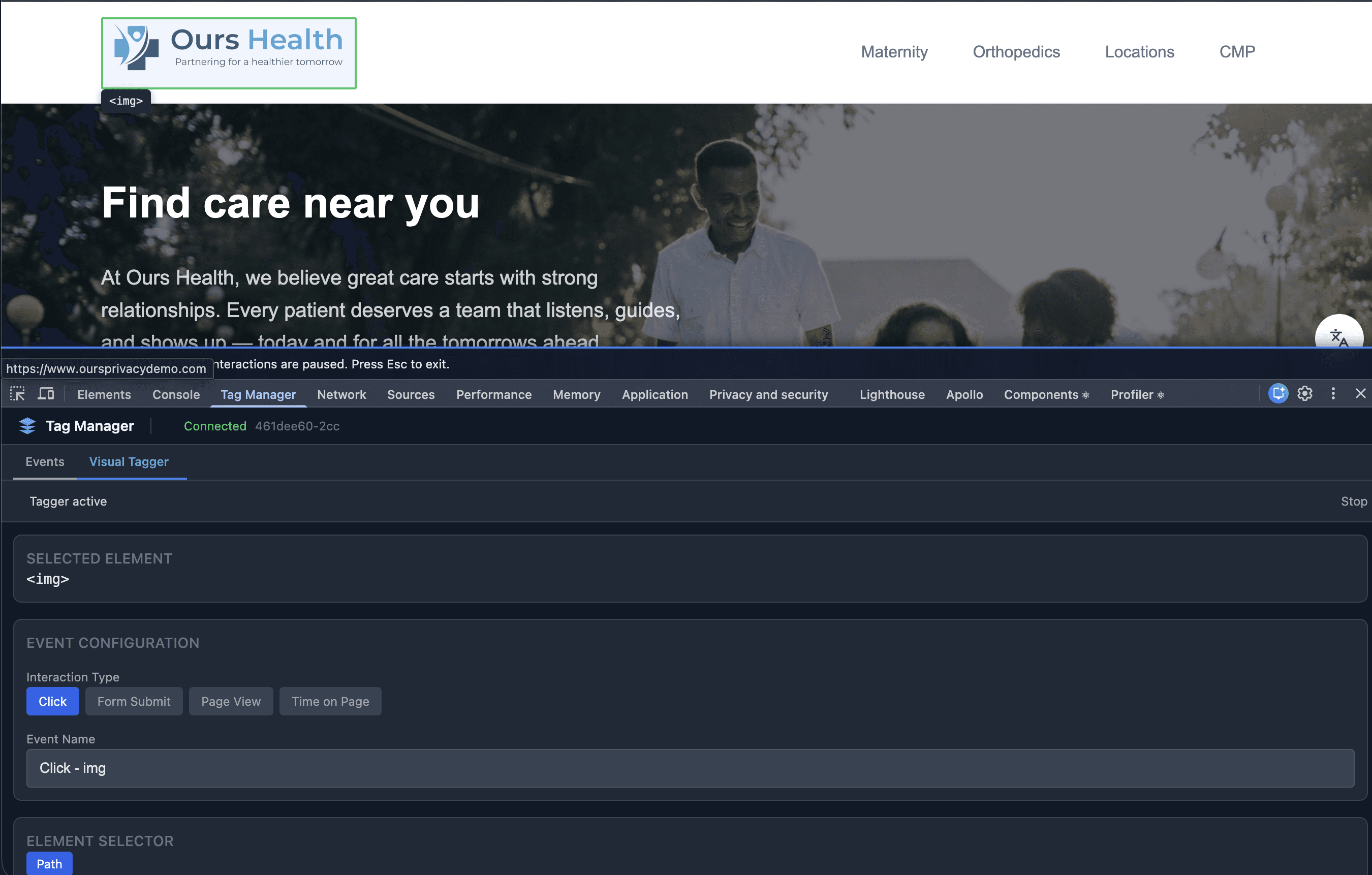
Instead of 15 minutes per event (writing selectors, testing in the console, copying to the tag manager, verifying) you point, click, review, and save. A full page's worth of events in the time it used to take to set up one.
Data Governance
Most public SDKs and tracking endpoints accept data from anyone. Your marketing team, your developers, and the open internet.
Not all of that data should make it into your system.
The principle is simple: least privilege. Only collect what you need, only store what you've approved, and only send what consent allows.
We've been building toward this. Our Global Dispatch Center already controlled where data went after storage, blocking events from reaching specific destinations based on consent rules. That was the first layer. Now we're expanding it into a full Data Governance hub, and this is the first of several releases in this area.
What's new:
Block Unknown Events From Saving (opt-in). Define an allow-list of event types your system should save. Events not on the list are dropped before they touch the database.
Property control. Toggle what properties should be allowed to exist on which types of events.
In practice: a developer instruments a new event that captures data you didn't intend to collect. Without ingest governance, that data hits your database and you're cleaning it up after the fact.
We're building Data Governance into a full suite.
Data quality monitoring
Collection health checks
Deeper controls over what gets collected and how it flows through the platform.
The goal is that you own your data pipeline end to end, not just the parts that happen after storage. More on this soon.
Audience Builder: Consent and Custom Property Filtering
The Audience Builder now supports easier filtering on consent status and custom visitor properties.
What's new:
Consent property filters. Build segments like "visitors who consented to marketing" or "visitors who have not opted into analytics" using the consent categories from your CMP.
Custom property filters. Filter on any custom property stored on your visitor profiles, including nested properties. If you're passing
plan,tier, orpreferences.regionvia identify calls, those are now available as audience filters.Dynamic discovery. Consent and custom property keys are discovered automatically from your actual visitor data. If the property exists on your visitors, it shows up in the filter dropdown.
Updated preview. The audience preview now includes Consent and Custom Properties columns so you can verify filters are matching the right visitors before publishing.
If you're running campaigns that should only target visitors who have opted into marketing, you can now build that audience directly instead of exporting and filtering manually.
What's Next
Data Governance is getting more releases. Data quality monitoring, collection health, and deeper pipeline controls are all in progress. The Visual Tagger is heading toward general availability with additional interaction types and public documentation. And Audience Builder has more export formats and scheduling on the way.
For setup and technical details, see our documentation.
Want to see any of this in action? Book a demo.
Related Articles
Newsletter
Stay up to date
Subscribe for privacy news, feature updates, events, etc.
