Product
Platform Updates: REST API, Funnel Visualizer, Consent Audit Reporting, and Heatmaps

We've been heads-down building, and this is one of our biggest releases yet. A public REST API that large teams can configure and manage everything programmatically. An upgraded funnel visualizer that shows exactly where visitors convert and where they drop off. Auditor-grade consent reporting that makes responding to compliance requests quicker and less painful. Heatmaps are moving into expanded beta. And a long list of improvements across the tag manager, web scanner, consent platform, and destination catalog.
There's a lot here. Let's get into it:
REST API & API Keys
If you're managing multiple sources, destinations, consent configurations, and replay settings across your organization, clicking through the UI for every change doesn't scale. We've shipped a public REST API that lets you query, create, update, and configure your entire Ours Privacy setup programmatically.
What's new:
Full configuration access: manage destinations, sources, allowed events, consent settings, dispatch centers, replay settings, versions, and more via REST endpoints
Scoped API keys: generate keys with granular permissions scoped to specific resources, or grant full access with an
allscope. Keys support optional expiration and are managed under Settings > API KeysOpenAPI specification: a machine-readable spec powers interactive API docs where you can explore endpoints and test requests directly
CLI, Node.js SDK, and Go SDK: typed client libraries so you can integrate Ours Privacy into your existing toolchain and CI/CD pipelines
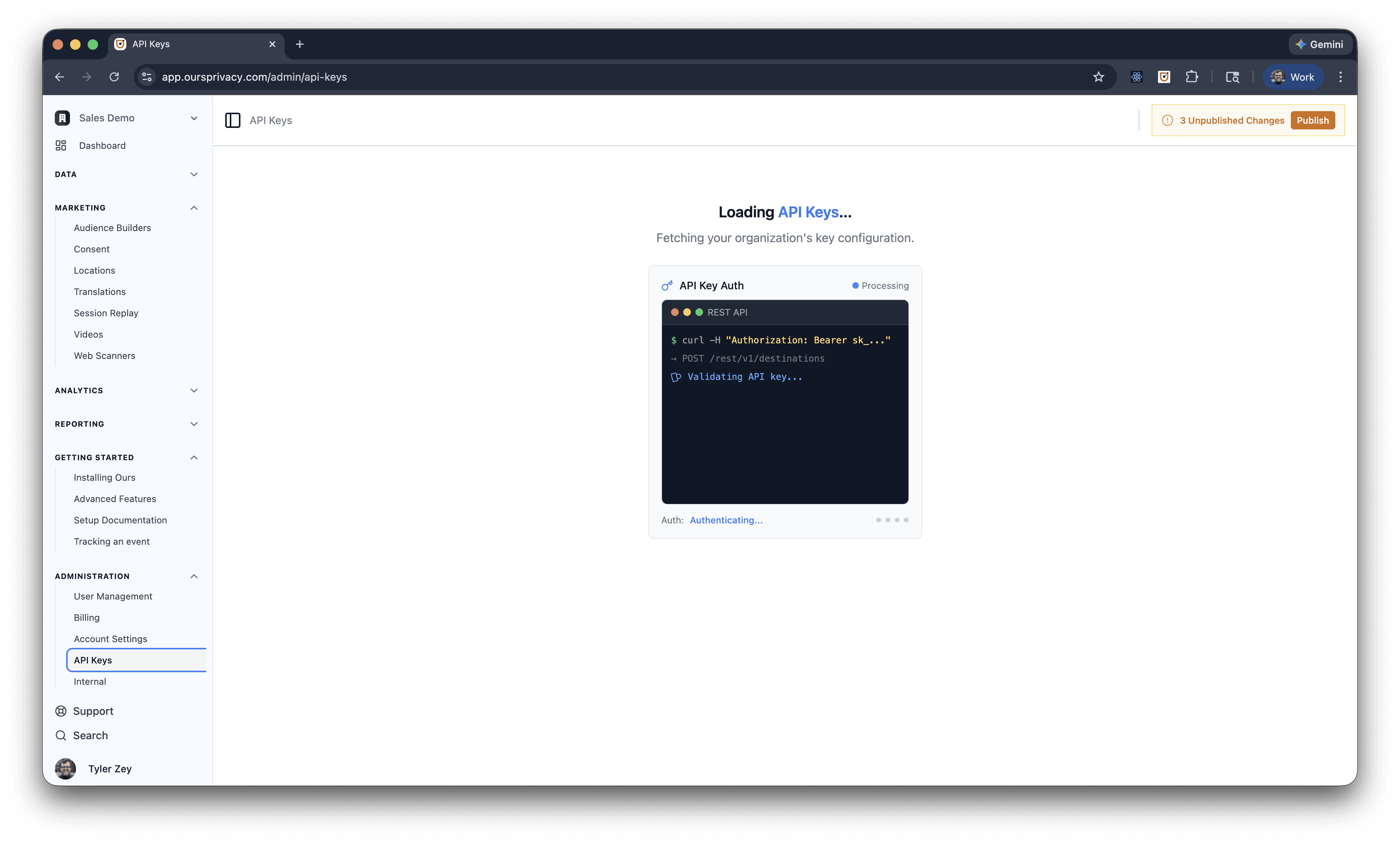
Most CDPs and analytics platforms either don't offer an API at all or lock it behind enterprise tiers. Our REST API is available to every customer and covers the same resources you manage in the UI — no feature gates, no separate pricing. If you can do it in the dashboard, you can do it via the API.
Documentation: API Overview | Node.js SDK \| Go SDK \| CLI
Funnel Visualizer
We've built funnel analysis directly into the platform. Define multi-step funnels, see exactly where visitors convert and where they fall off, and drill into the sessions that didn't make it without leaving Ours Privacy.
What's new:
Multi-step funnel builder: define funnels using page views, events, or a combination of both. Add as many steps as you need
Visual funnel chart: clean, visual breakdown of conversion and drop-off percentages at each step.
Time-to-conversion: measure how long it takes visitors to move between steps, so you can identify where friction slows people down
Drop-off analysis: see exactly how many visitors abandoned at each step and what percentage continued
Session replay integration: click into dropped sessions to watch what actually happened when a visitor didn't convert
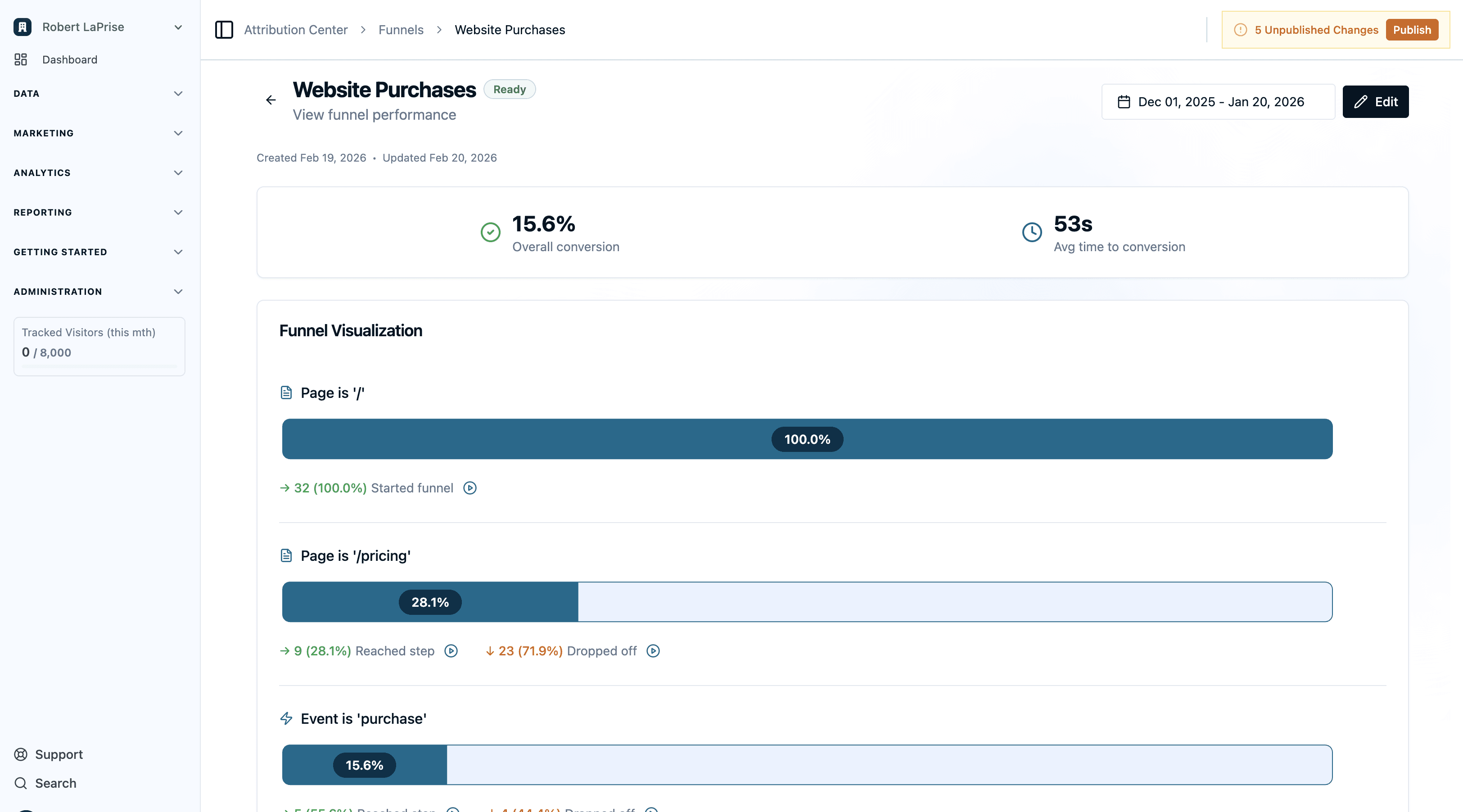
You're spending real budget driving traffic to booking pages, contact forms, and service lines. Knowing that 76.8% of visitors who land on your booking page don't complete the appointment — and being able to watch their sessions to understand why — turns a vanity metric into an actionable insight.
Auditor-Grade Consent Reporting
Our consent platform has always included analytics, with opt-in rates, opt-out patterns, and breakdowns by category. We've also supported per-state and per-region configuration, so you can run different banner designs and consent options depending on where the visitor is located. However, the process of auditing consent using analytics reporting was cumbersome.
Auditor-grade consent reporting closes that gap. When a regulator or legal team sends a request, you can now respond quickly with the full picture.
What's new:
IP address and user agent logging: consent receipts now capture the visitor's IP and browser user agent alongside the consent decision, so auditors get the evidence trail they expect
Bulk export: export consent records in bulk for external review, legal discovery, or integration with your compliance management system
Policy version tracking: each consent record captures which version of your consent policy was active at the time of collection. If a visitor in California saw your CCPA-specific banner and a visitor in Texas saw your default, the records reflect that. If you update your policy next month, the reporting shows exactly when each visitor transitioned between versions over time
When someone asks "can you prove this visitor consented under your Q1 privacy policy?", you don't have to dig through logs. The answer is in the consent record: which state or region they matched, which banner version they saw, what they selected, and when. If your policy changed and they came back, you can see the full version history for that visitor.
Heatmaps (Expanded Beta)
We've been building heatmaps as a complement to Session Replay, and it’s now available in expanded beta. Heatmaps give you aggregate behavioral data across all visitors on a page — where they click, how far they scroll, and where they get frustrated.
What's new:
Click heatmaps: see where visitors click most frequently, overlaid directly on your page
Scroll depth: visualize how far down the page visitors actually scroll, with percentage markers
Rage clicks: identify elements where visitors click three or more times in rapid succession, signaling confusion or frustration
Dead clicks: find clicks on non-interactive elements that visitors expected to be clickable
Device filtering: view heatmaps for desktop, tablet, or mobile independently
Date range, geography, and browser filters: narrow your analysis to specific segments
Overlay toggle: switch the heatmap overlay on and off to compare the raw page with behavioral data
CSV export: export click data for further analysis
Session replay drilldown: click on any hotspot to see the individual sessions that generated those clicks
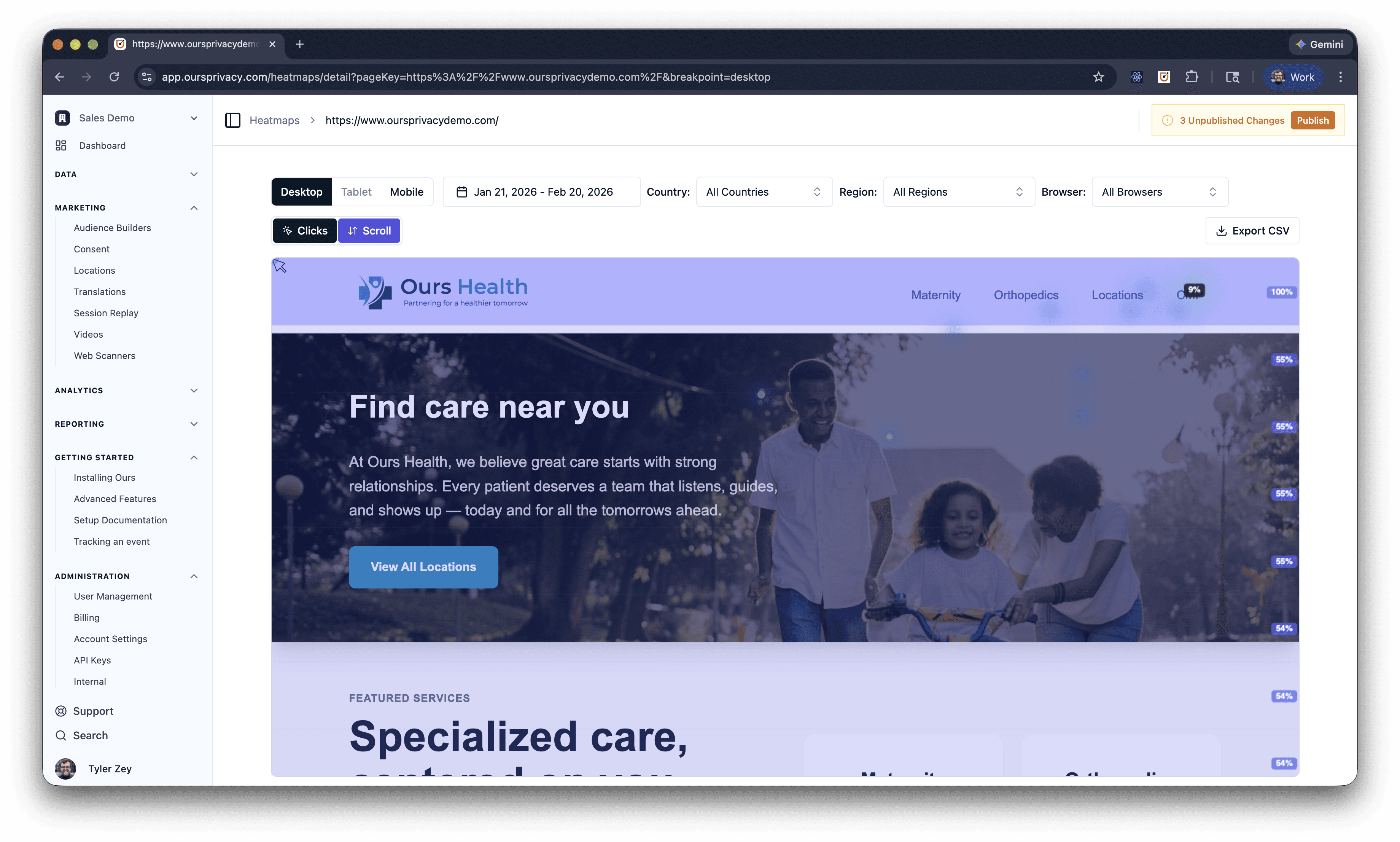
Heatmaps activate automatically when Session Replay is configured with no extra scripts or setup required. SPA route changes are detected automatically, so you get per-page heatmaps even on single-page applications.
Heatmaps are currently in expanded beta. Reach out to your account manager to get access enabled for your organization.
Documentation: Heatmaps Overview | Installation
Tag Manager
We continue to build advanced functionality into the Our Privacy Tag Manager. This release adds control over tag firing order, new variable types, and a redesigned debugging experience.
What's new:
Tag sequencing and execution priority: set explicit firing order for your tags. When multiple tags fire on the same trigger, you now control which runs first. Critical for cases where a consent check or data layer population needs to complete before downstream tags execute
Local storage and session storage variables: two new variable types that read values directly from the browser's local storage or session storage. Use these in triggers and tag configurations without writing custom JavaScript
Chrome extension overhaul: the tag debugger extension has been redesigned with an onboarding panel (replacing the popup), events grouped by page load for easier scanning, and collapsible sections for tags that didn't fire
Tag sequencing solves a class of problems that previously required workarounds like using setTimeout delays or custom event listeners to ensure tags fire in the right order. Now you set a priority number and the tag manager handles it.
Consent Platform & Web Scanner
Beyond the auditor-grade reporting above, we've shipped several improvements to the consent banner and web scanner.
Consent:
Three new button layouts: Accept Only, Preferences Only, and Information Only layouts give you more control over how the consent banner is presented. Use Accept Only for a streamlined experience, Preferences Only to skip the initial banner and go straight to granular controls, or Information Only for notice-style banners that don't require a decision
Duplicate consent settings: clone an existing consent configuration as a starting point for a new one, instead of rebuilding from scratch. Useful when managing multiple domains with similar but not identical consent requirements
Web Scanner:
JS/CSS keyword scanning: the web scanner now crawls returned scripts and stylesheets, scanning for privacy-sensitive keywords. This catches trackers and data collection that wouldn't be visible from just analyzing network requests or DOM elements
CSP analysis and reporting: Content Security Policy headers are now analyzed and reported as part of every scan. See which domains your CSP allows, identify overly permissive policies, and get recommendations for tightening your security posture
New Destinations & Platform Improvements
New destinations:
Google Pub/Sub: stream events to Google Cloud Pub/Sub for real-time processing in your GCP infrastructure. Credentials are managed securely via SSM
Quantcast Conversion API: send conversion events to Quantcast for measurement and audience optimization
Destination enhancements:
Facebook CAPI test_event_code: test your Facebook Conversions API events before going live. Set a test event code in the destination settings and verify events appear correctly in Facebook's Events Manager test tool before switching to production
Platform improvements:
Unified user profile on event card: the Recent Events view now shows a unified visitor profile alongside each event, so you can see who triggered the event without navigating to a separate page
Raw inbound payload view: event data and the raw inbound payload are now displayed separately in Recent Events. Debug ingestion issues by comparing what your source sent versus how it was processed
Embeddable maps with custom domains: location maps embedded on your site now work with your custom domain, keeping the experience on-brand
Unified identify endpoint: the web SDK
identifycall and the server-side APIidentifycall now share the same processing logic, ensuring consistent visitor resolution regardless of how the call originates
What's Next
This is one of our largest releases, spanning a new public API, two new analytics products, auditor-grade compliance tooling, and improvements across every product area. We're continuing to expand the REST API surface, add more funnel analysis capabilities, and build out the heatmaps feature set as we move toward general availability.
For setup and technical details, see our documentation.
Ready to see these updates in action? Book a demo to learn how we're making healthcare marketing compliance easier.
Related Articles
Newsletter
Stay up to date
Subscribe for privacy news, feature updates, events, etc.
