Product
Platform Updates: Attribution Tables, Enhanced Consent Analytics, and Web Scanner Improvements

Healthcare marketing teams often struggle with unclear attribution insights, fragmented consent data, and overwhelming web scanner findings. Today we're announcing major improvements across attribution reporting, consent management, and web scanning — all designed to solve these challenges and give you deeper insights into visitor behavior and better tools for managing compliance.
Here's what's new:
Attribution Tables: Advanced Filtering and Journey Analysis
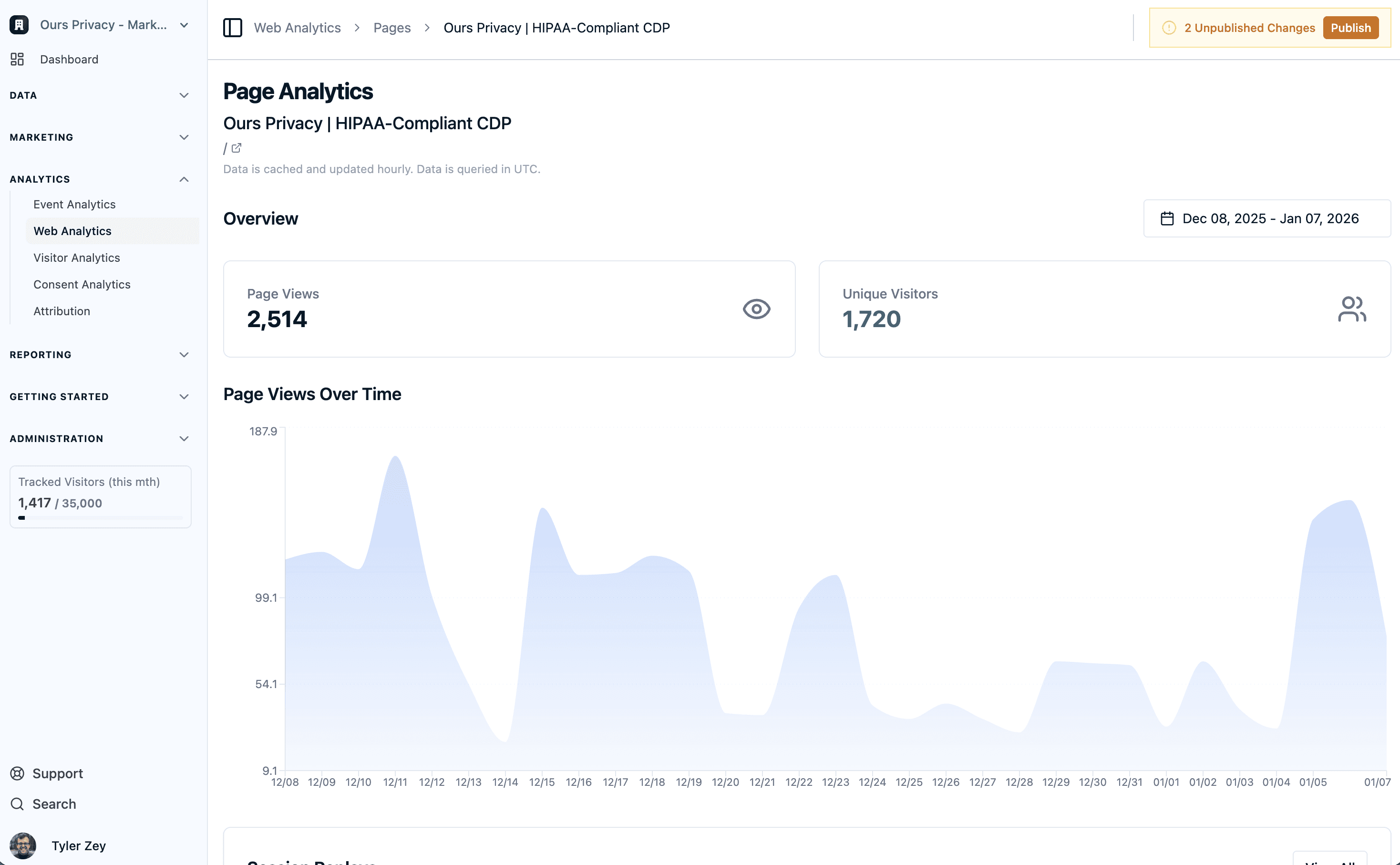
Understanding visitor journeys and campaign attribution is essential for optimizing marketing spend, but attribution data can often be fragmented and difficult to analyze. We've built powerful attribution tables that give you more comprehensive visibility into visitor behavior and campaign performance.
What it provides:
Browse all pages for unique sessions and traffic: see page-level attribution data with unique session counts and traffic metrics
Filter by UTMs: filter attribution data by UTM parameters to understand which campaigns are driving results
Sort by metrics: sort attribution tables by any metric to quickly identify top-performing pages or campaigns
Advanced filtering: narrow down your visitor base with advanced filtering by path name, UTM parameters, and locations
First and last touch attribution: switch between first touch and last touch attribution models to understand different aspects of visitor journeys
Integration with Session Replay: If session replay is enabled, all attribution data connects back to Session Replay, so you can replay visitor sessions for any attribution segment
Why this matters:
Healthcare marketers can now understand visitor journeys from multiple perspectives. You can see which pages drive initial visits (first touch) versus which pages drive conversions (last touch), filter by specific campaigns or UTM parameters, and then view actual session replays to understand the behavior behind the data. This creates a complete picture of how visitors move through your site and which campaigns are most effective.
Enhanced Consent Analytics: Understand Opt-Out Patterns by Region and Page
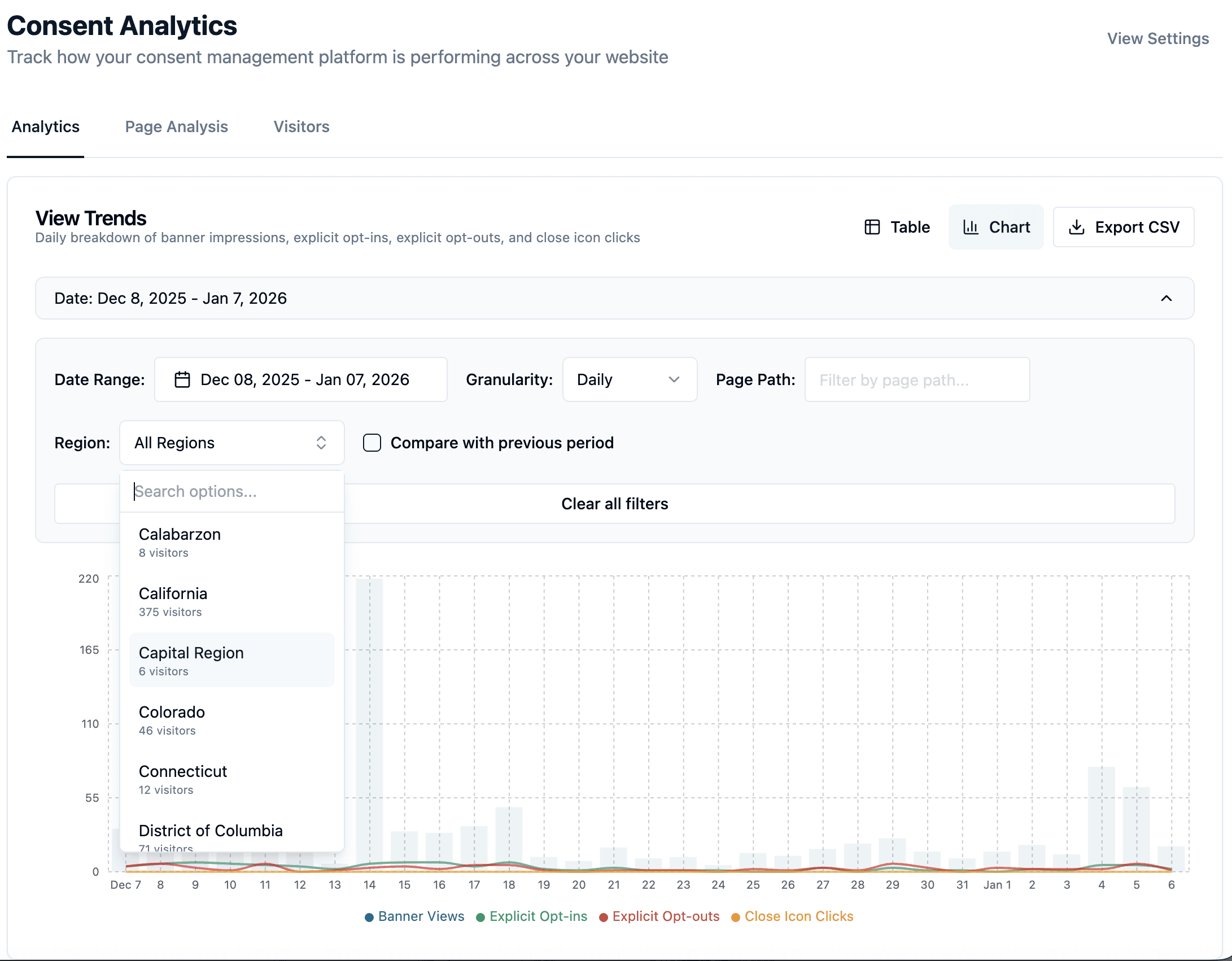
Understanding consent behavior is critical for healthcare compliance, and having more detailed insights into who's opting out, where they're opting out, and how that varies by region makes that understanding even stronger. We've dramatically enhanced the Consent Analytics Center to give you granular visibility into consent patterns.
What's new:
View analytics by region - see consent rates and opt-out patterns broken down by geographic region
See who opted out - understand which visitors are choosing to opt out and track those patterns over time
Identify opt-out pages - see exactly which pages visitors are opting out on, not just overall consent rates
Opt-out percentage by page - understand what percentage of visitors are opting out on specific pages, helping you identify problematic pages or user experience issues
Why this matters:
Healthcare marketers can now identify exactly where and why visitors are opting out. Instead of seeing only overall consent rates, you can drill down into specific pages or regions to understand if certain content, messaging, or user experiences are driving opt-outs. This visibility helps you optimize consent experiences and improve compliance rates.
New Consent Platform Modes: Auto-Dismiss and Enhanced Visibility
Consent management platforms need to balance visibility with user experience. We've added new consent platform modes that give you more control over how consent banners behave, especially in auto-show mode.
What's new:
Auto-dismiss after time - if your consent platform is running in auto-show mode, you can configure it to automatically dismiss after a certain amount of time if visitors don't interact with it
Auto-dismiss after page views - automatically dismiss the consent banner after a visitor views a certain number of pages without interacting
Close icons on all themes - all consent banner themes now include an option to display visible close icons, giving visitors a clear way to dismiss the banner without changing consent.
Why this matters:
Healthcare organizations can create consent experiences that are visible and compliant without being intrusive. If a visitor doesn't interact with the consent banner after viewing multiple pages or after a set time period, the banner can automatically dismiss, reducing friction while maintaining compliance visibility. The addition of close icons across all themes ensures visitors have a clear way to dismiss the banner if they choose.
Consent Design Center: Save Your Colors Without CSS Variables
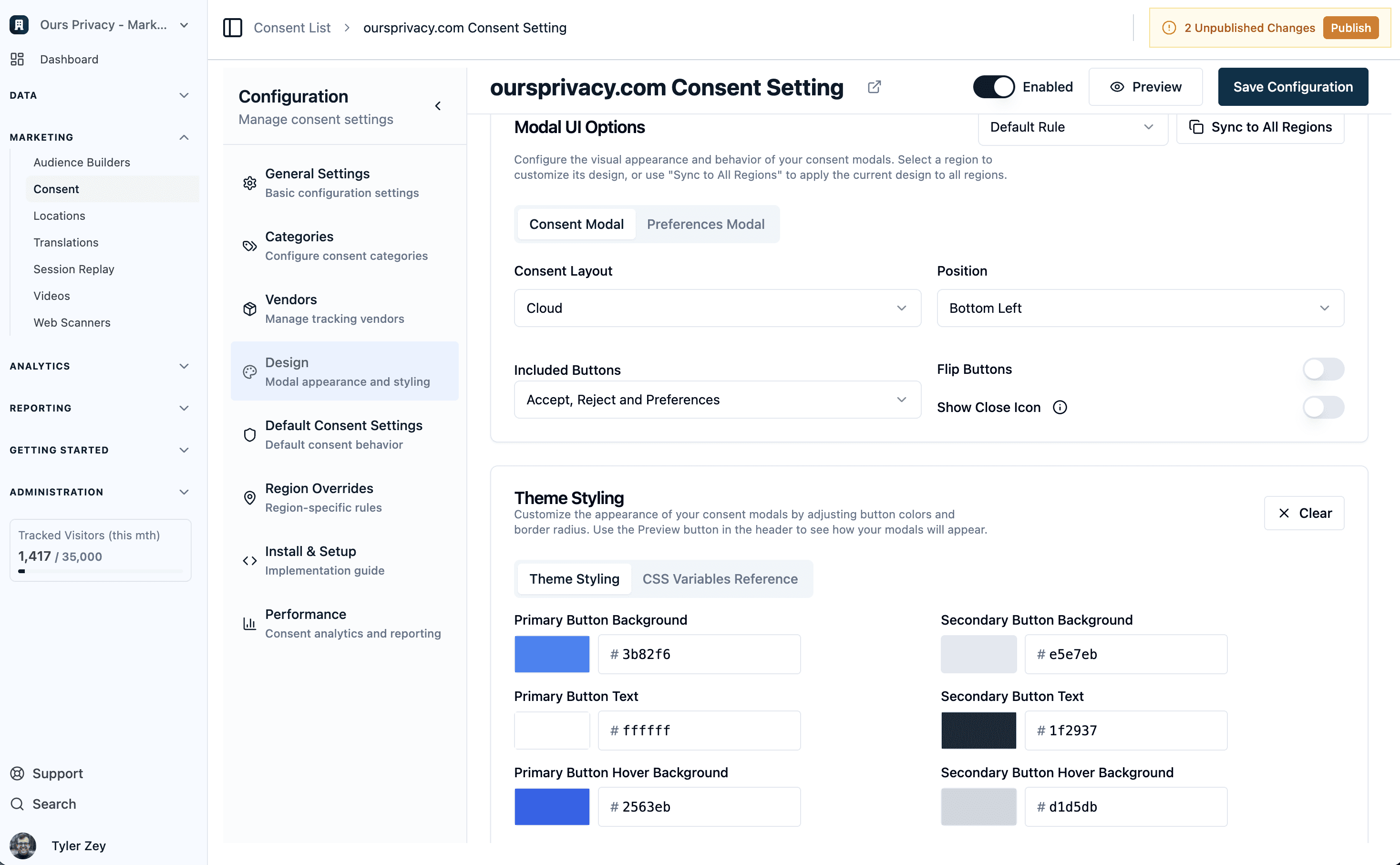
Customizing consent platform colors has previously required managing CSS variables, which can be cumbersome for non-technical team members. We've launched a Design Center that lets you save and manage your color palette directly in the UI.
What's new:
Save colors in the Design Center - define and save your brand colors without touching CSS
No CSS variables required - manage your entire color palette through the UI
CSS variables still supported - if you prefer using CSS variables, that option remains available
Why this matters:
Marketing and compliance teams can now customize consent platform colors without developer involvement. Instead of asking developers to update CSS variables every time you want to adjust colors, you can manage your entire color palette directly in the Design Center. This makes it faster to iterate on consent experiences and ensures brand consistency across your consent banners.
Web Scanner Improvements: Categorize, Suppress, and Exclude
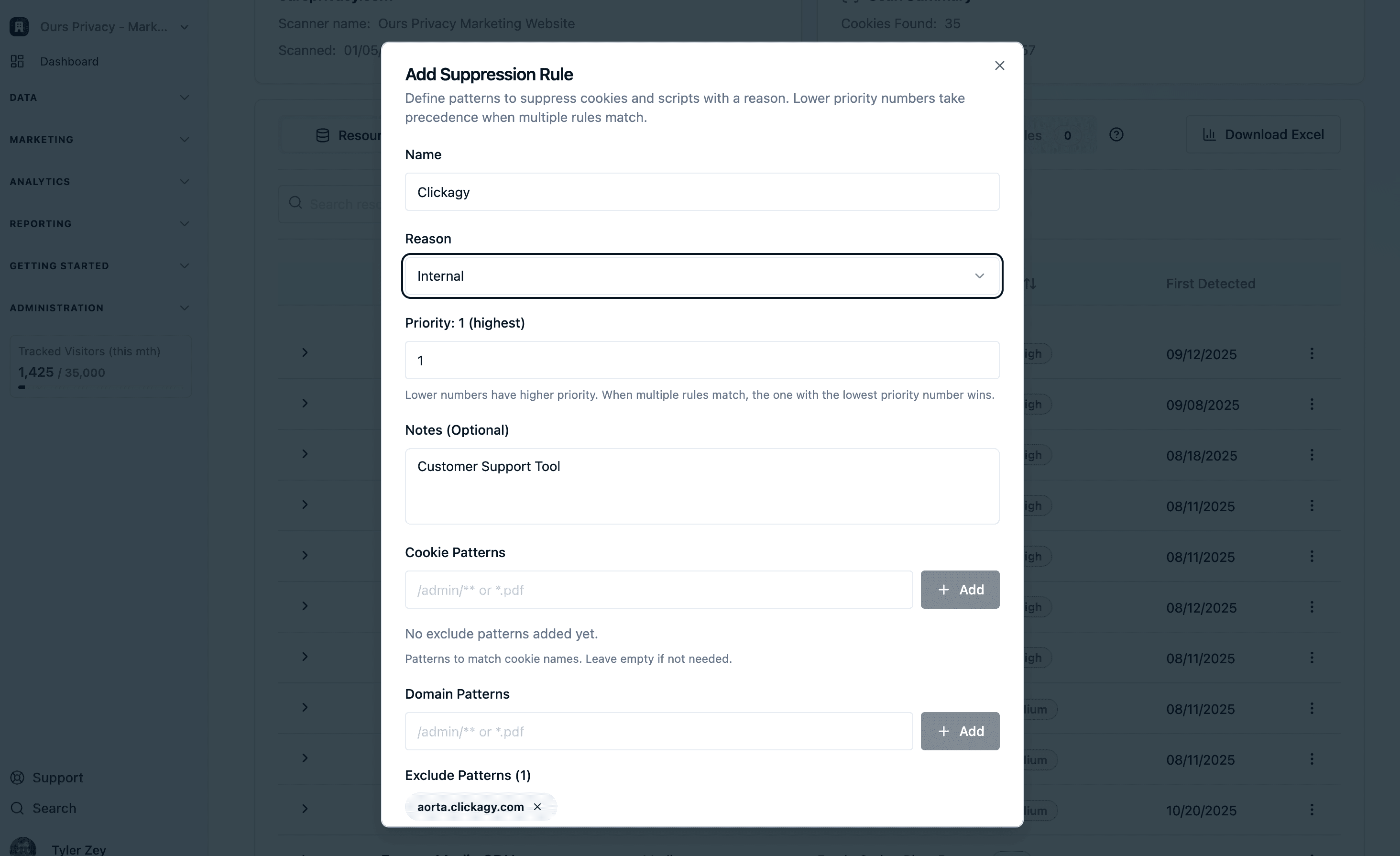
Web scanners are essential for compliance monitoring, but managing the findings can be overwhelming, especially when you have legitimate relationships with vendors (like DAA agreements) that create false positives. We've enhanced the web scanner with powerful management capabilities that let you take control of your findings.
What's new:
Categorize findings - organize scanner findings into categories to better manage and prioritize issues
Dismiss findings - mark findings as dismissed so they don't clutter your view
Add notes - attach notes to findings to document context, resolutions, or follow-up actions
Suppress findings - if you have a DAA or other legitimate relationship with a vendor, you can suppress those findings so they don't appear in your view again
Exclude pages from crawling - specify pages that should be excluded from scanner crawling, so you don't get findings for pages you don't want monitored
First and last touch attribution - switch between attribution models to understand visitor journeys in the context of scanner findings
Integration with Session Replay - all scanner findings connect back to Session Replay (if enabled), so you can replay visitor sessions to understand how findings relate to actual user behavior
Why this matters:
Healthcare compliance teams can now manage scanner findings efficiently. Instead of seeing the same legitimate vendor relationships flagged repeatedly, you can suppress them once and focus on actual compliance issues. The ability to categorize, add notes, and exclude pages makes it easier to prioritize findings and track resolution progress. Connecting scanner findings to Session Replay helps you understand the real-world impact of compliance issues on visitor experience.
What's Next
These updates are building toward a more powerful, more flexible platform for healthcare marketing and compliance. Attribution tables provide comprehensive journey insights, enhanced consent analytics give you the visibility you need to optimize consent experiences, new consent platform modes and the Design Center make customization easier, and web scanner improvements make compliance monitoring more manageable.
As always, you can explore our full docs for setup guides and technical details.
Ready to see these updates in action? Book a demo to learn more about how we're making healthcare marketing compliance easier.
Related Articles
Newsletter
Stay up to date
Subscribe for privacy news, feature updates, events, etc.
