Product
Block First, Ask Later: Enforce Mode for Consent, Smarter Session Replay, and a Better Analytics Engine

Your consent banner has always been good at managing the scripts you know about. The gap was the ones you don't. A marketing team adds a new chat widget, a developer drops in a monitoring script, an ad network injects a piggyback tag. None of those are in your vendor list, so they run regardless of what settings the visitor chose. If you’re using Ours Privacy’s CMP, you have had weekly web scan monitoring and one-click add vendor capabilities within our integrated platform to make it easier to keep your CMP up-to-date. Now, we’ve added another feature to make it simpler to keep your CMP compliant.
Resource Blocking now has an Enforce mode that flips the default. Instead of letting unknown scripts through and catching them later, Enforce blocks everything that isn't explicitly categorized. That's a big deal for healthcare teams where a single uncategorized script can open a compliance gap.
This shipped alongside major improvements to Session Replay, the analytics engine powering Channels and Funnels, and export across every analytics view.
Here's what's new:
Consent Resource Blocking: Enforce Mode
The Resource Blocking setting in your consent configuration now has two modes. Monitor lets uncategorized resources through (the previous default). Enforce blocks them until you categorize them.
What Enforce mode does:
Blocks uncategorized scripts, images, iframes, and links before they execute, so unknown third parties never fire without consent
Works alongside your existing vendor configuration. Known vendors follow their category rules as usual. Only unrecognized resources get blocked
Surfaces blocked resources in your dashboard so you can see what's being caught and decide how to categorize each one
For most consent tools, "blocking" means managing a list of known vendors. Enforce mode handles the rest. Anything new that shows up on your site gets blocked automatically until you've reviewed it and assigned a category. No more relying on periodic audits to catch what slipped through.
Session Replay: More Control Over What You Capture
Session Replay now gives you direct control over how recordings are captured, how long they're kept, and what triggers them. Instead of recording everything from page load, you can tailor the behavior to match your traffic volume and the questions you're actually trying to answer.
What's new:
Sampling controls: Set a sampling rate to capture a representative percentage of sessions instead of recording everything. Useful for high-traffic sites where you need insight without the storage cost
Customizable retention periods: Configure how long recordings are stored. Sessions are automatically cleaned up after the retention window expires
Event-based triggers: Start recording based on specific events rather than capturing every session. Record sessions where a form submission fails, where a visitor hits a specific error state, or where a key conversion event fire.
Channels and Funnels: A Sharper Analytics Engine
Channels and Funnels both got the configuration options that turn them from "view what happened" into "answer a specific question." And every analytics view across the platform now supports export.
Attribution Models and Lookback Windows
Channels now supports multiple attribution models. Choose between last-touch (credits the final touchpoint before conversion), first-touch (credits the channel that originally brought the visitor), and linear (distributes credit evenly across every touchpoint).
You can also configure lookback windows to control how far back the attribution engine looks when connecting touchpoints to conversions. A 7-day window catches recent campaigns. A 30-day window captures longer consideration cycles. And UTM-based campaign matching ties conversions directly to the campaigns you're running by matching against ad destination URLs.
Funnel Event Filters and Conversion Settings
Funnels now support filtering each step by event properties and default properties, using the same query builder from Audience Builder. You can also configure:
Conversion windows: Set how long a visitor has to complete the funnel from first step to last
Counting methods: Choose between unique users (each person counted once) and total events (every occurrence counted)
Step ordering: Choose strict ordering (exact sequence required) or flexible ordering (steps can happen in any order within the window)
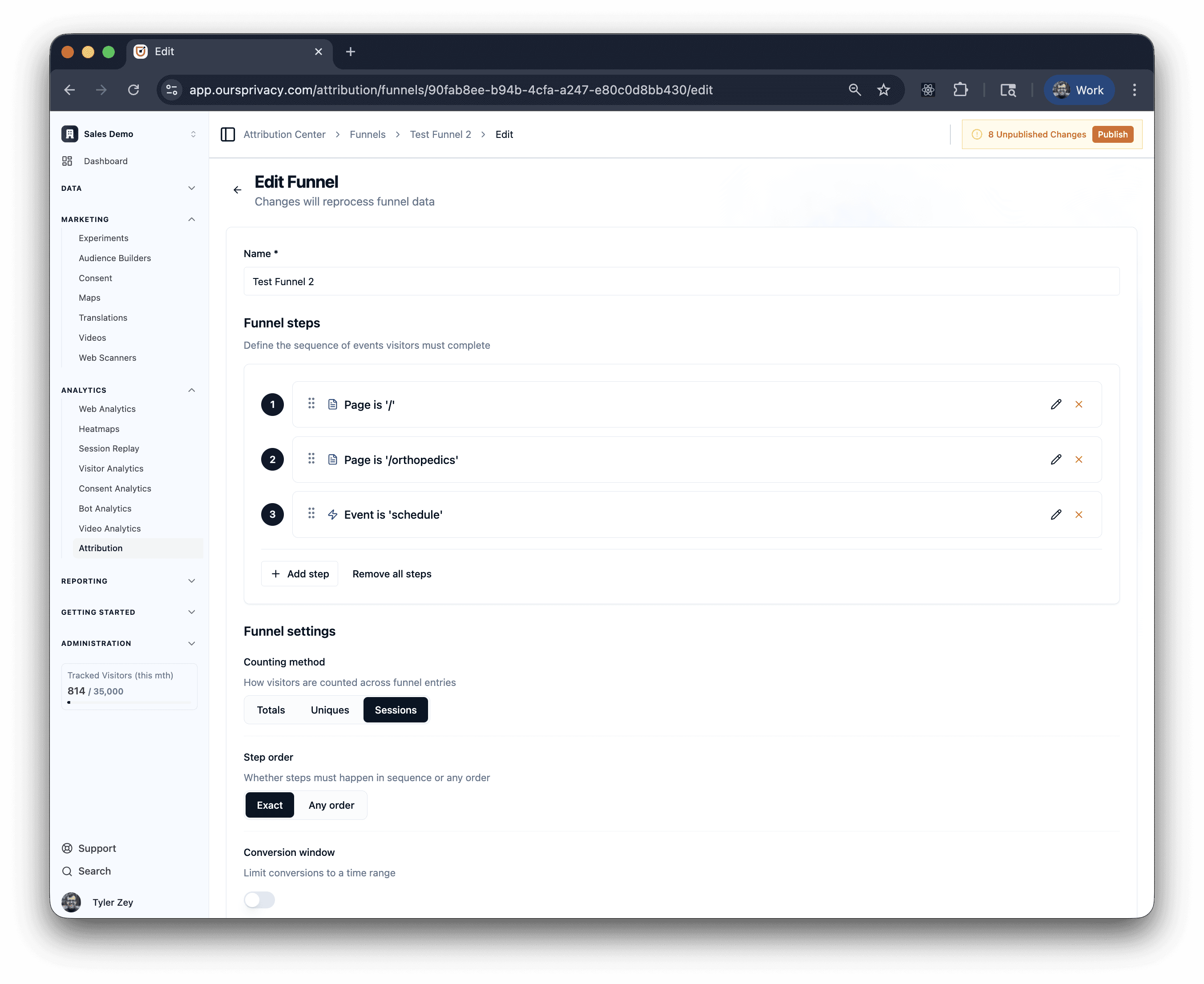
These controls let you answer questions like "what percentage of visitors from a paid campaign completed the demo request form within 48 hours" without exporting data or writing SQL.
Analytics Export
Every analytics view in the platform now supports export. Click the export button on any dashboard, breakdown, or report to download the data as a file you can share, drop into a spreadsheet, or attach to a report.
What's Next
Channels will get additional attribution models and deeper integration with the rest of the analytics suite. Funnels will add cross-linking into session replays so you can watch recordings of visitors who dropped off at specific steps. Session Replay triggers will expand with more event types and conditions.
Enforce mode is live now. If you're running the CMP, switch Resource Blocking from Monitor to Enforce in your consent settings to start catching uncategorized resources automatically.
For setup and technical details, see our documentation.
Want to see any of this in action? Book a demo.
Related Articles
Newsletter
Stay up to date
Subscribe for privacy news, feature updates, events, etc.
