Product
Platform Updates: Audience Performance, Faster Heatmaps, and Four New Destinations

The most consistent ask we've heard from teams using Audiences: I can see who's in this segment, but what does it actually drive? Conversions, revenue, form completions. The data was there, but the connection wasn't. This release adds that report. It also ships performance improvements to heatmaps and session replay, and four new destinations for pushing event data to downstream tools.
Here's what's new:
Audience Performance
The Audience Performance report connects your audiences to revenue. Select an audience, a conversion event, and a revenue property, then choose an attribution window and date range. The report shows conversions, conversion rate, unique converters, total value, and average value per conversion, all with a period-over-period comparison on every metric.
What it does:
Conversion and revenue metrics: Track conversions, converters, and total revenue from any audience with period-over-period deltas for each metric
Attribution windows: Choose from in-range, 7-day, 14-day, or 30-day windows to match your typical consideration cycle
Source / medium / campaign breakdown: See which channels are driving conversions from each audience, with separate columns for conversions, converters, and total value
Conversion timeseries: View daily, weekly, or monthly trends to spot the impact of a campaign launch or seasonal shift
The core workflow is built for the kinds of questions healthcare marketing teams run into constantly. Which visitors from this email campaign converted? What revenue did our audience of admitted patients drive over the last 30 days? Which UTM source is responsible for the most form completions from this segment?
To try it, go to Attribution in the sidebar and click Audience Performance Report. Select your audience, conversion event, and revenue property, then pick your attribution window and date range.
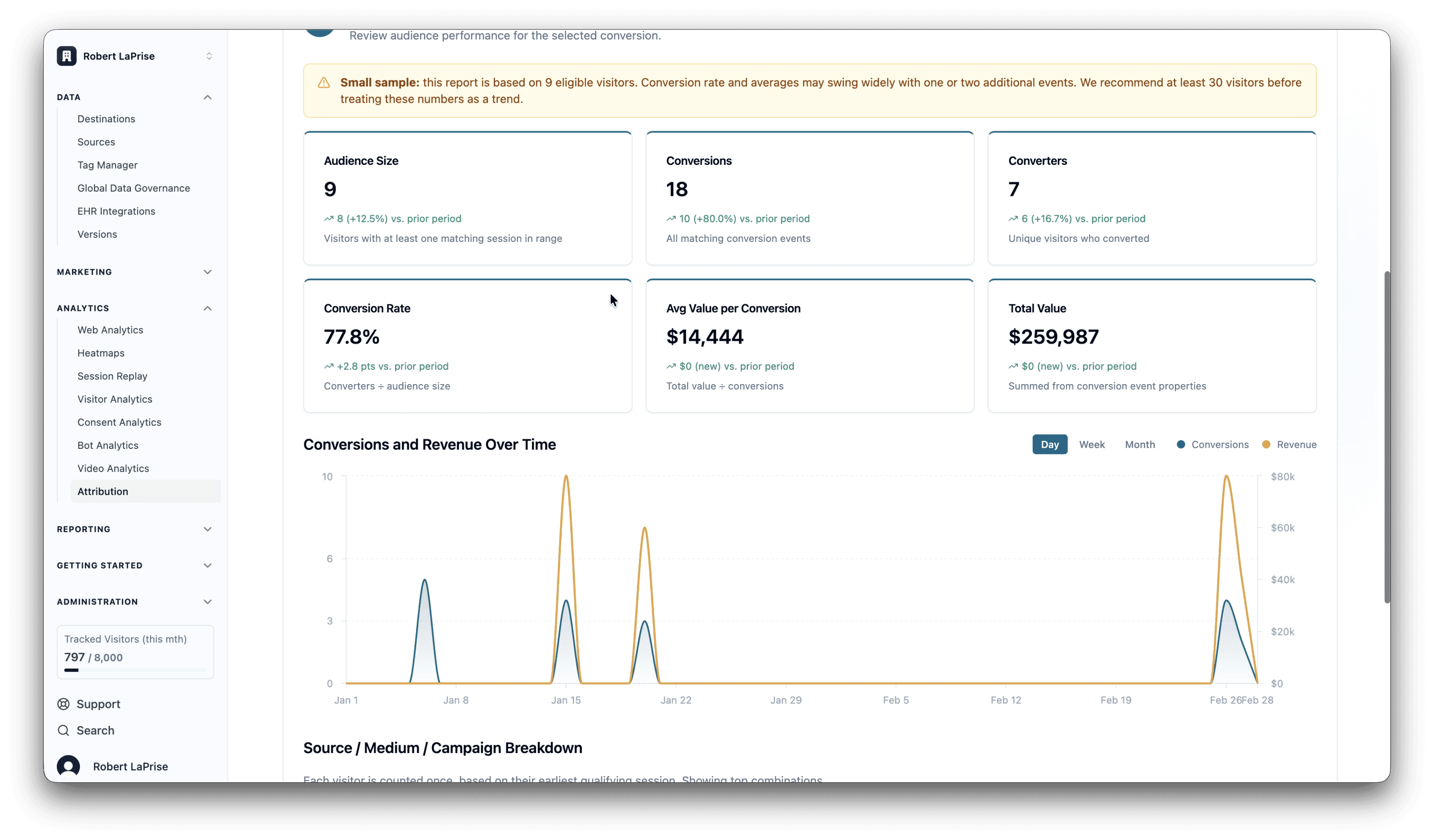
Audience Performance is in private beta. Request access to try it with your team.
Heatmaps and Session Replay
Heatmaps and session replay now load noticeably faster and are more stable under load. We rebuilt the query layer behind both the list views and detail views, which cut load times significantly across high-volume accounts. No configuration changes needed.
This release also ships more granular control over what session replay captures and what gets redacted. The class-based masking controls work well for elements you own. For third-party widgets, form tools, and CMS-driven content, those same controls can now be set entirely through configuration, without touching your HTML.
The opt-out pattern is worth calling out for teams with strict privacy requirements. Enable global text masking across the entire site, then selectively unblock only the elements safe to show in replay. It gives privacy and compliance teams a cleaner story: everything is redacted unless explicitly cleared.
For the full reference, see the session replay privacy and masking docs.
Four New Destinations
Destinations determine where Ours forwards your event data. These four are now available under Data > Destinations.
Roku Ads Conversions API sends conversion events to Roku's server-side API. Healthcare teams running connected TV campaigns can measure ad performance without a client-side pixel, which keeps sensitive data out of the browser and off Roku's servers entirely.
PostHog forwards events to a PostHog instance. If your product or engineering team uses PostHog for product analytics, this destination keeps your behavioral data in sync without adding a separate SDK to the page.
Attentive sends events to Attentive's API for triggering SMS and email automations. Use on-site behavioral events from Ours to fire Attentive flows based on what visitors actually do.
Admitad S2S Postback sends server-side postback events to the Admitad affiliate network. Conversions are attributed without relying on client-side pixels or cookies, which matters in environments where third-party scripts are restricted or blocked.
Search by name in Data > Destinations to add any of these to your account.
What's Next
Audience Performance will expand with additional attribution models and tighter integration with Channels and Funnels. Heatmaps and session replay will keep getting faster as we extend these backend improvements across more of the analytics layer. And more destinations are on the way, giving healthcare teams more channels to reach server-side under a single BAA without adding another vendor.
Related Articles
Newsletter
Stay up to date
Subscribe for privacy news, feature updates, events, etc.
