Product
Platform Updates: Accessibility Scanning, Trackable Short Links, and a Self-Serve Audit Log

This batch is about one thing: giving regulated teams more confidence and more control without adding a vendor for each new capability. You can now see accessibility risk on your own site, track campaign reach as first-party data, undo a draft before it goes live, get fresher data in your warehouse, and review your own audit trail when scrutiny comes.
Here's what's new:
Accessibility Scanning in the Web Scanner
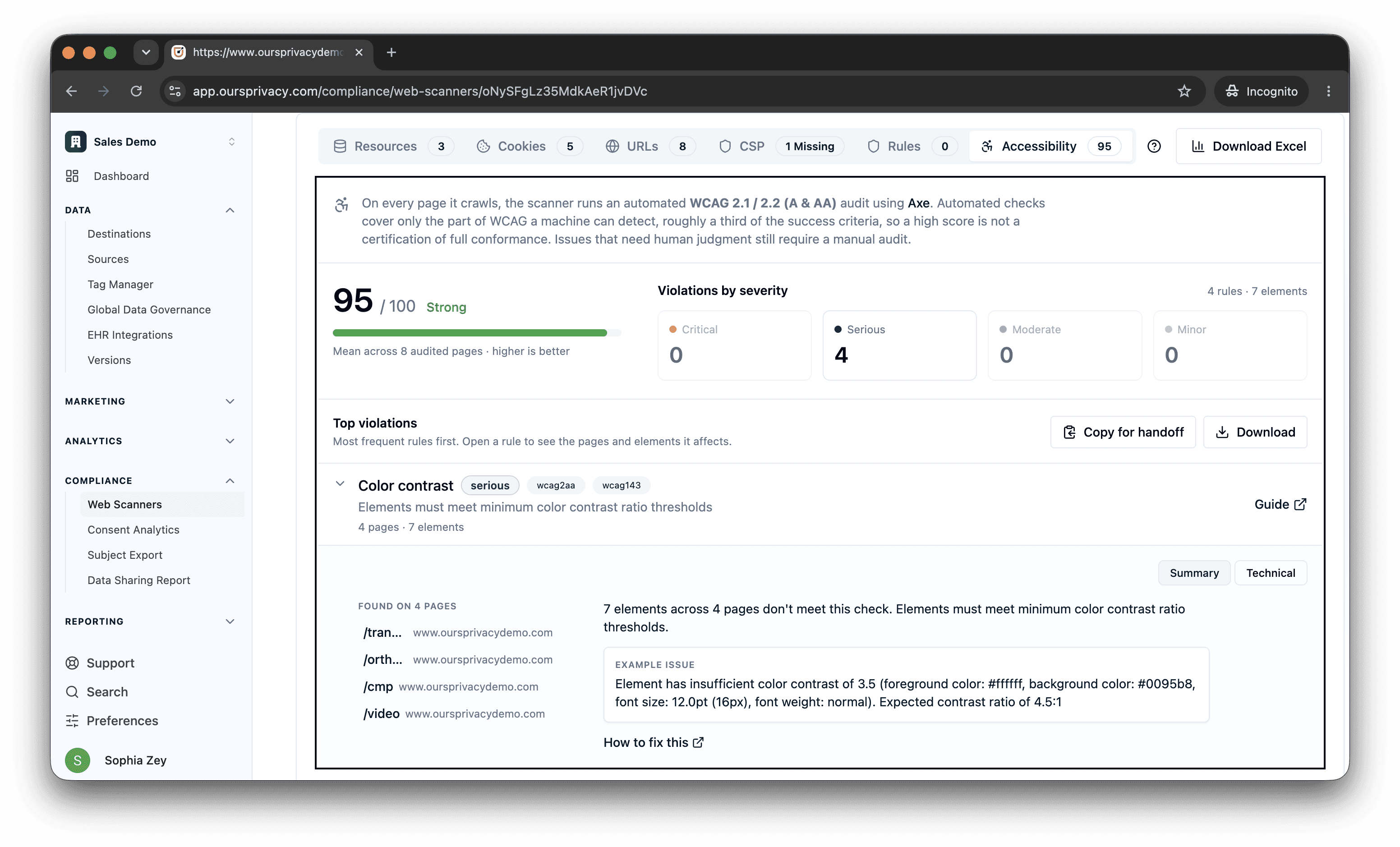
The Web Scanner already crawls your site for trackers, tags, consent coverage, and privacy posture. It now checks the same pages for accessibility violations on every crawl. Each page is evaluated against WCAG 2.1 and 2.2 criteria, the same standard ADA Title III claims are measured against, and the findings show up alongside the privacy results you already review.
What it does:
Flags WCAG violations per page: Missing alt text, low color contrast, broken ARIA, unlabeled form fields, focus order, and landmark structure, each tagged with the rule, the WCAG criterion, severity, and the element selector so your team knows exactly what to fix.
Scores your site and tracks the trend: A per-site accessibility score with a per-page breakdown, charted over your crawl history so you can see whether you are improving or regressing.
Alerts on new and regressed issues: New or worsened violations feed the same notification path as the rest of your scanner findings, so a regression on a key page does not wait for the next manual review.
Reads through the REST API and your AI assistant: Accessibility findings are available over the same REST and MCP surface as everything else, so you can pull them into a report or ask your assistant to summarize what changed.
Accessibility lawsuits are a real and growing pressure on the same teams that already worry about privacy. The usual answer is a separate accessibility vendor with its own dashboard and its own bill. We folded the check into a scan you already run, so accessibility risk lives next to privacy risk in one posture view. One note on scope: automated checks catch the portion of WCAG that a machine can detect reliably, so this finds the common, high-volume issues. A full conformance audit still needs a human, and the scanner says so.
Trackable Short Links and QR Codes
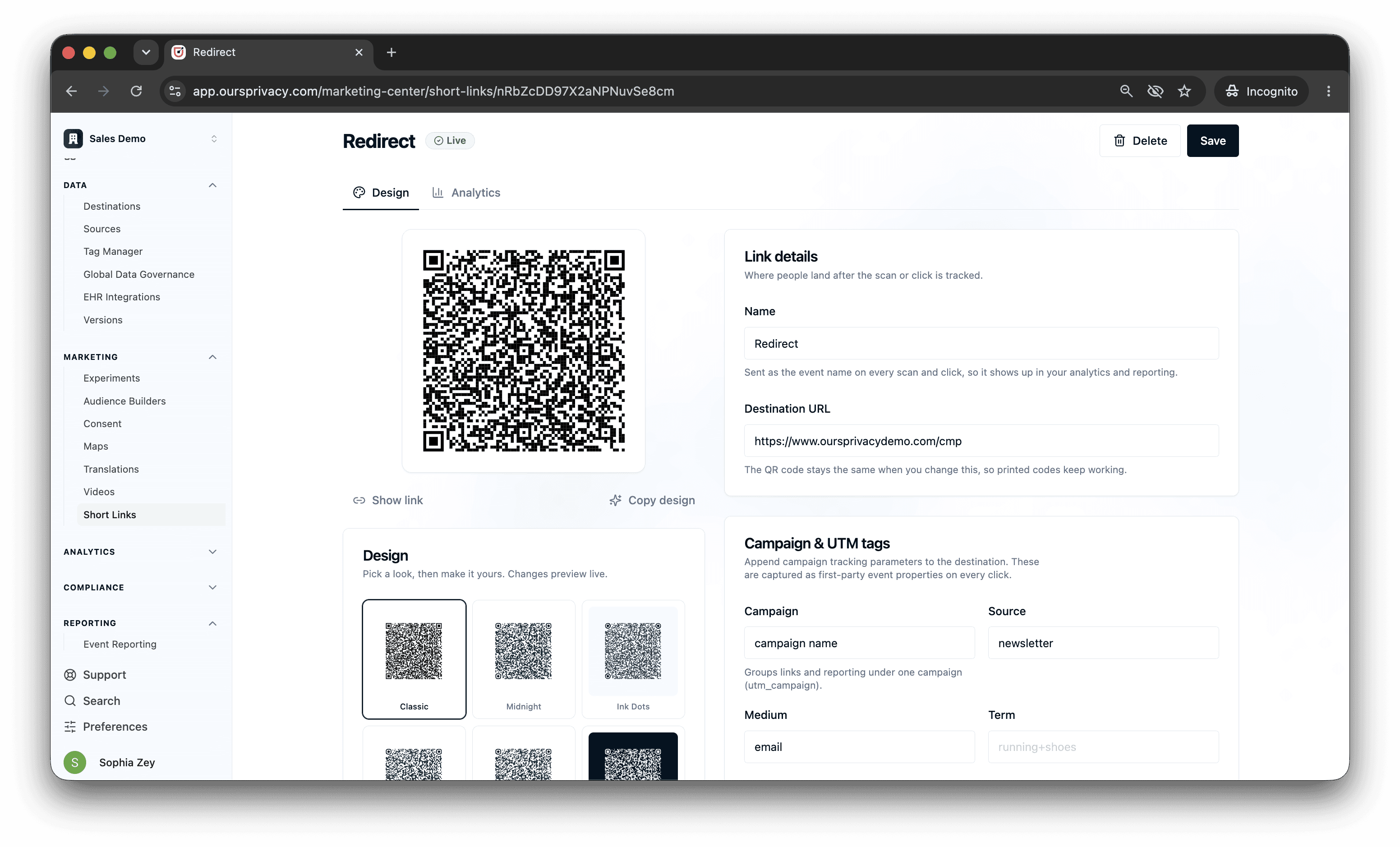
You can now create branded short links and QR codes inside the platform, and every click and scan is captured as a first-party event in the same pipeline as the rest of your analytics. The link resolves through our edge, records the click with its campaign and UTM metadata, then redirects to the destination. Generate a QR code for any link as a downloadable PNG or SVG, and create them in bulk for a campaign.
What it does:
Mints branded short links and QR codes: Build a short URL on your own domain, attach campaign and UTM metadata, and download a QR code for print, packaging, events, or out-of-home placement.
Captures every click and scan first-party: Each click or scan becomes an event carrying the short code, campaign, UTMs, referrer, geography, and device, flowing into Analytics, your destinations, and Audience Builder.
Reports per link and per campaign: Clicks and scans, unique versus total, time series, and geography, with QR scans distinguished from web clicks.
Filters out the noise: Bot and crawler hits on the redirect are removed from your reported counts using the same bot detection that protects the rest of your data.
The difference from a tool like Bitly or Dub is that the click does not get stranded in a separate link-tracking silo. It becomes a behavioral event you can query, attribute, and turn into an audience, under the same consent rules and the same BAA as everything else you collect. That bridges offline and online: a QR code on a mailer or a booth becomes part of the same first-party graph as a click from an email.
Abandon and Revert Draft Changes
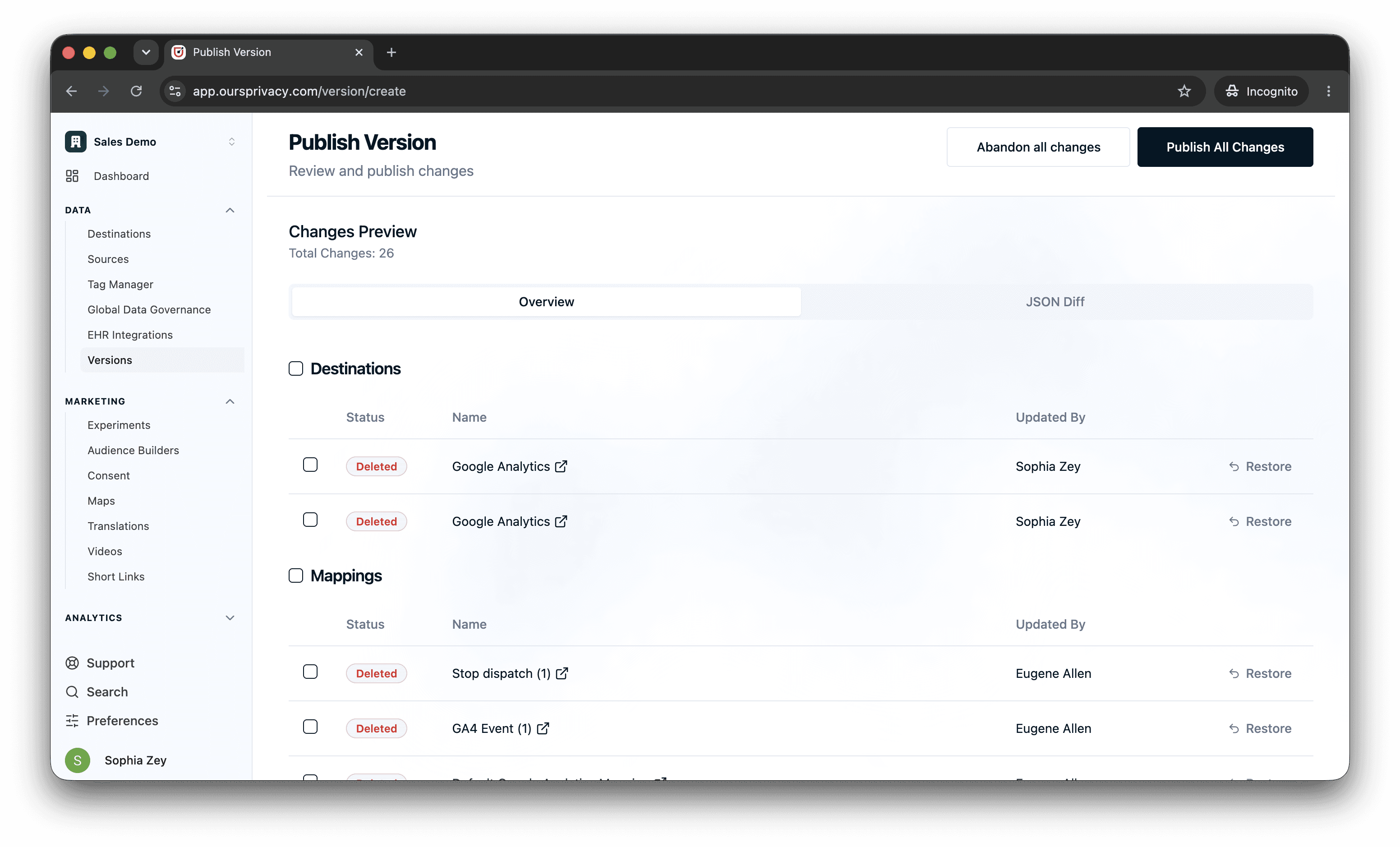
Before now, every edit you made to an entity was live in your draft the moment you made it, and the only way to walk one back was to redo it by hand. You can now abandon changes from the Changes Preview on the publish screen, the same way Google Tag Manager lets you discard a workspace edit.
What it does:
Revert a single change: Roll one modified entity back to its last published state from the per-row controls in the Changes Preview.
Restore a deleted entity: Bring back something you removed in the current draft without rebuilding it.
Discard all changes: Reset the entire draft to the last published version in one action when a set of edits did not pan out.
For a regulated team, publishing is a careful moment, and the freedom to back out cleanly is what makes it safe to move quickly. This came directly from customers who wanted to undo a set of draft edits without recreating their previous configuration from memory.
Faster Warehouse Sync
Warehouse destinations synced once a day, exporting the previous full day of events, dispatches, and visitors to your storage. There was no way to get fresher data. You can now choose a faster cadence per destination.
What's new:
A sync frequency selector on each warehouse destination: Keep the daily default, or opt a destination into an hourly cadence for near real-time delivery.
The daily default is unchanged: Any destination you do not touch keeps syncing exactly as it did, so nothing changes unless you opt in.
Fresher warehouse data makes Ours usable for operational and reverse-ETL workflows instead of next-day reporting only. Hourly sync is opt-in per destination and is being rolled out to interested accounts first. If you want a destination moved to the faster cadence, contact support and we will turn it on for you.
Review Your Audit Log Yourself
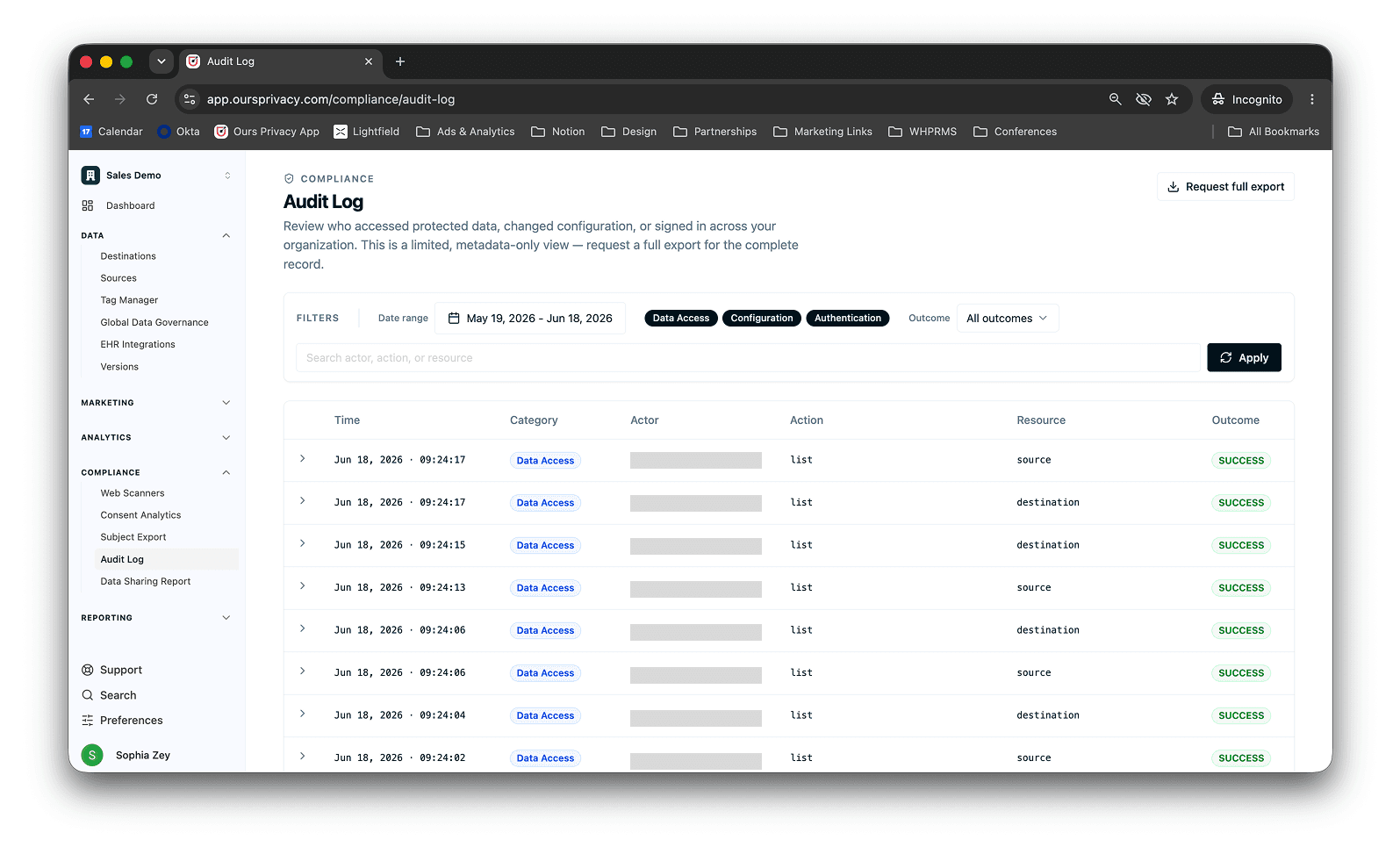
Every change to your configuration and every access to protected data is recorded in your HIPAA audit log. Until now, seeing it meant asking us. You can now search and filter a view of that log directly in the admin UI, the way Stripe and Clerk let you review your own audit trail.
What it does:
Search and filter the audit log: Look across HIPAA and configuration audit events to answer who did what and when, without opening a support ticket.
Request a full export when you need one: For a complete record beyond the in-app view, a single action requests a full export from support.
Periodic audit log review is a standard part of a compliance program, and making teams email for it every time added friction to something they should be able to do on their own schedule. This puts the routine review in your hands and keeps the full export one click away for when an auditor needs the complete picture.
What's Next
The thread through this release is doing more inside one platform, under one agreement, with a clear record of what happened. We are continuing to push accessibility findings deeper into the same posture and alerting surfaces as privacy, and to widen what you can reach through the REST API and your AI assistant. If there is a workflow you are still stitching together from separate tools, tell us, because that gap is usually the next thing we build.
Related Articles
Newsletter
Stay up to date
Subscribe for privacy news, feature updates, events, etc.
